Compared to the Claude and Codex wizards online I’m still way behind, because my technical skills just aren’t that strong.
But I do have a few Skills and Hooks I think you’ll like, because I use them every day. They take no technical skill, they’re pure logic, and they fit knowledge workers like me with no coding background:
Just paste the link into your Agent and it’ll walk you through it and install everything for you.
I later recorded a video about it: New to Claude Code and Codex and can’t get them to listen? I’m packaging up everything I’ve worked out with mine, for free | EP.37.
Two hooks inside. First, claim-guard. This one came from noticing that Claude likes to lie: says it verified when it didn’t, says it searched and found nothing when it never searched. The moment the hook catches the agent making a claim like that, it goes and checks whether the tool calls actually used a verification or search command. If not, it tells the AI to show its evidence, and if it can’t, back to doing the work honestly.
Second, no-emoji. I personally hate emoji in documents, so this hook scans whatever the AI is about to write for emoji and blocks it. One time it even blocked the write where I was editing the hook script itself.
Then there are five skills:
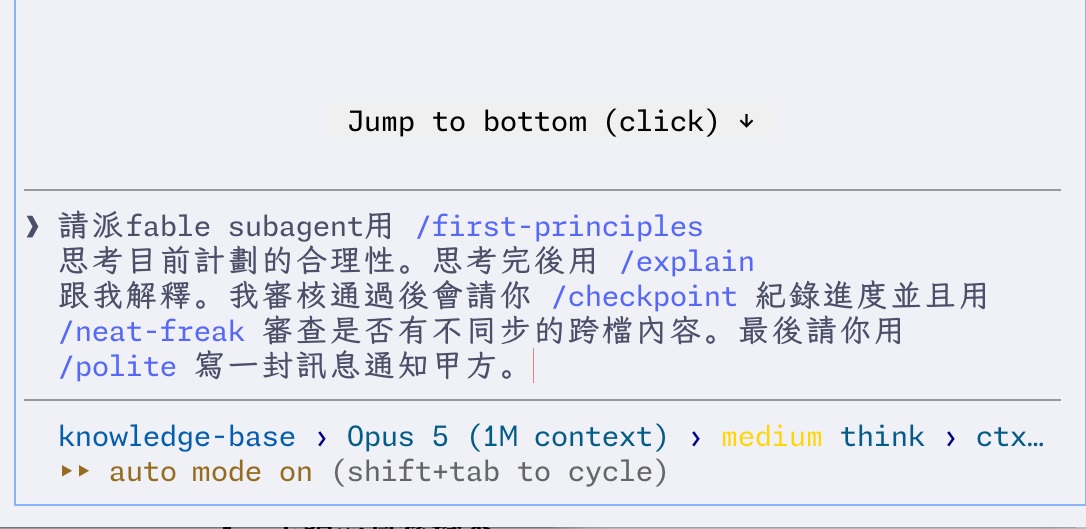
/explain: Claude often doesn’t talk like a human. This forces it to treat me as a high schooler with no background, drop the acronyms and jargon, and explain things clearly./first-principles: When my own reasoning gets stuck, this uses Musk’s “first principles” to question whether something even makes sense, find the essence of the problem, and reason from there again. Whenever things get completely tangled I reach for it, and it usually cuts through to the core and strips away the unnecessary branches./checkpoint: For wrapping up. It logs to the knowledge base, does the git commit and push, and checks for formatting problems./neat-freak: Reviews whether information is out of sync across files, so the AI doesn’t get contradictory context later./polite: Teaches the AI how to speak politely. Best for writing outward-facing email.
2 and 4 are heavy mods of open source projects, LICENSE included.
Here’s what it looks like in use:
Folded In: Start With a Harness That Works Out of the Box
Just go with codex. Unless you really understand how hermes works under the hood, the codex or claude code harness is the most stable thing you can run out of the box right now.