On this page
I recently built a Claude Code plugin called work-mode. With a single command, you can switch the AI’s working mode. There are separate toggles for letting it work autonomously, delegating bulk tasks to other AIs, or helping wrap things up. There is also an /at command that tells it whether I am at my computer or on my phone, and it adjusts its response format accordingly.
This post covers four things in order: where I was getting stuck, how I wanted the AI to behave, specific data from a week of testing, and the actual prompts I used during development. At the end, I included a starter template so anyone building their own version can adapt it directly. If you want the technical details, jump to Appendix: how it is built.
Want AI working in your own job, not just in demos? See the 3-month 1-on-1 program →
The Original Issues
The first issue was that the AI paused to ask too often. Many steps ran purely on my local machine. If something broke, git could revert it immediately. Still, it would stop and wait for my approval. I later had the AI search my conversation logs. Over the past three weeks, 28 messages across 25 conversations said the exact same thing: “Don’t ask me along the way,” or “I give you full autonomy to finish this task, don’t ask me along the way.” Saying the same sentence 28 times meant I shouldn’t be typing it by hand every time.
The second issue was task delegation. I have external quotas for Gemini (via agy) and Codex. I wanted to offload bulk work like verification, summarization, and line-by-line categorization to them, saving Claude’s quota for decisions only it could make. But when I ran four test prompts written in my natural voice, it didn’t delegate any of them. Even a 960-line classification task—the clearest candidate for delegation—was handled entirely by the main thread.
The third issue was the opposite: wrapping up. When I wanted to end a conversation, I often typed things like “I’m ready to wrap up,” or “Is there anything else that needs my decision?” Statistics pulled by the AI showed that over three weeks, wrap-up requests appeared 35 times, and requests to “report progress and list decisions needed from me” appeared 32 times. But during wrap-up, it frequently opened new tangents or scattered pending decisions throughout its reply, forcing me to dig through the text.
The fourth issue was mobile devices. Sometimes I check the AI’s responses on my phone, but its default format is tailored for desktop screens: ASCII flowcharts, wide tables, and long code blocks. On my computer, I want rich diagrams and review pages. On my phone, I just want concise text.
What I Wanted and How It Evolved
What I really wanted was a set of working modes I could switch at any time, with clear visual feedback on the screen showing which one is active. In the end, I built three modes:
- auto (autonomous): Take action without asking for local, reversible changes. Checks that previously paused for approval now block directly, tell the AI how to fix the issue on its own, and continue. High-stakes actions like sending external emails, making payments, deleting unrecoverable data, or altering permissions still pause every time, but are queued on a list to ask all at once when work finishes.
- out (delegate): Reminds the AI on every prompt to offload batch tasks to agy or Codex first. The prompt also includes remaining quotas on both sides.
- wrap (converge): Stop taking on new tasks and focus purely on finishing current work. Every response ends with a list of decisions requiring my sign-off, each paired with its recommendation. Once everything is clear, it reminds me to run the wrap-up command.
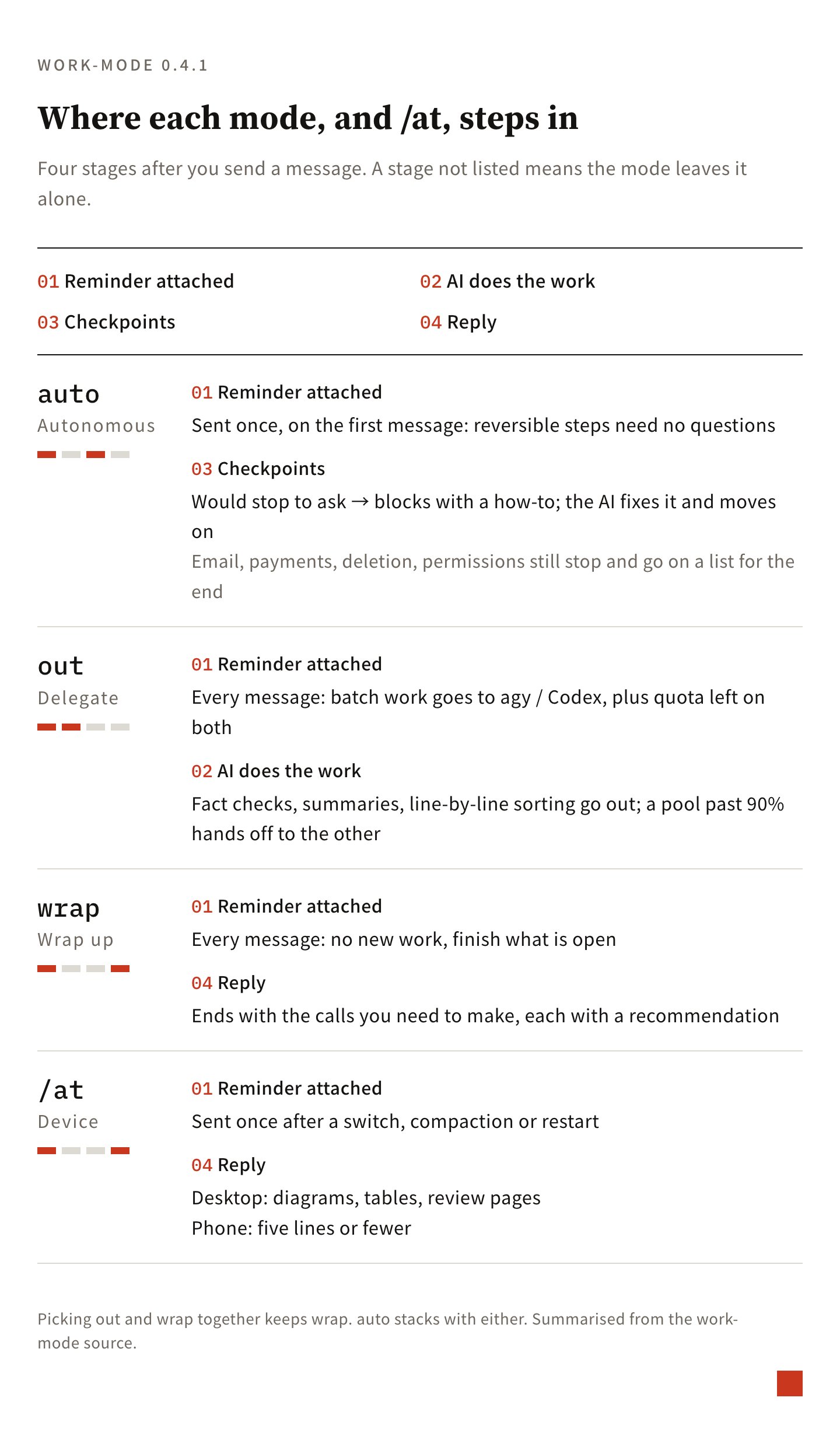
Here is how the development unfolded. Below are the key adjustments made along the way:
10/21, the first version. The same day the first version was working, I asked whether we should add a “don’t ask me along the way” mode, having it search my history to verify how often I said it. It surfaced the 28 messages mentioned earlier, which is how auto was added.
10/21 afternoon, switching to “execution speed first.” That day, I felt the AI had gotten clumsy, so I asked it to compare recent conversation logs. The model itself hadn’t changed. The issue stemmed from too many delegation rule changes over those two days. Multiple prompts were telling it to “delegate first,” so even tasks I was actively waiting on were being sent out. When an external service stalled, 14 full minutes passed without a single update. After discussing it, we set a core principle: take the fastest path for tasks I’m waiting on and deliver immediately; delegate only bulk, background tasks I’m not waiting on. From then on, out became the sole delegation toggle. Leaving it off by default keeps things fast.
10/23, out shows the quotas. I discovered why out felt ineffective: external quotas were nearly exhausted, causing calls to be blocked. So out was updated to attach the remaining quotas on both sides every time, routing to the other service whenever one exceeded 90% usage.
10/25, version 0.4.1 after a week of testing. This version followed a week of real-world use, bringing three key shifts:
- The menu now supports multiple selections. The original menu allowed only one option at a time, so switching from auto to wrap turned off auto automatically (see the data in the next section for why this mattered).
- Arguments can be combined freely in any order, such as
/work-mode wrap auto. When both out and wrap are selected, wrap takes precedence. Selecting both usually means work is winding down, so launching new delegated tasks should stop. - The approach for
/atwas completely overhauled. Originally, device instructions were placed in the static system prompt loaded at conversation start. However, that prompt doesn’t update mid-conversation, taking effect only after compaction or a restart. In one session, after switching back to my computer, the AI assumed I was still on mobile for an hour and a half. Now, reminders are sent only once after switching devices or after context compaction, without attaching to every message. This saves tokens.
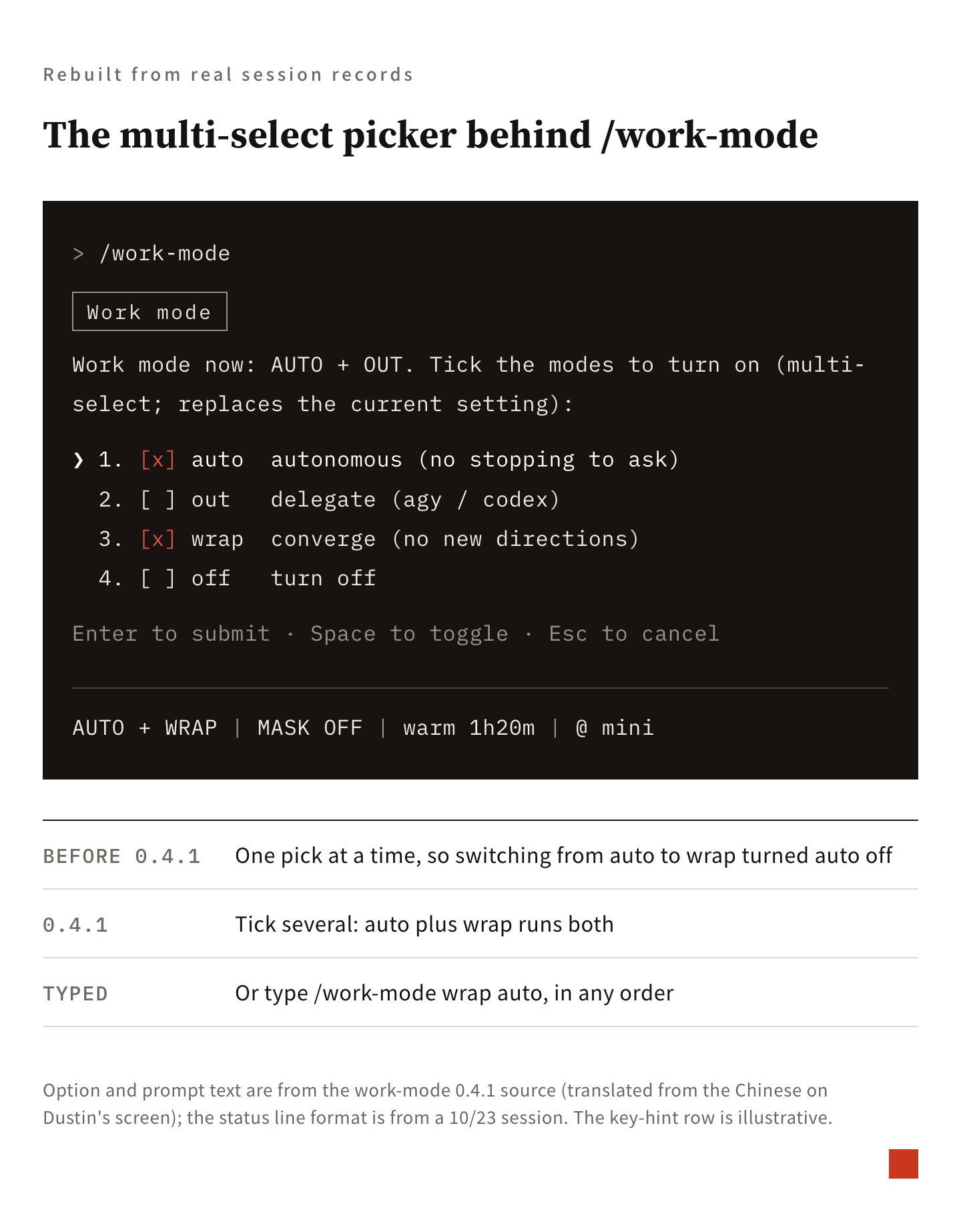
One Week of Testing
On 10/25, I asked the AI to measure behavior changes using my conversation history. The dataset covered 136 conversations and 1,098 turns involving my direct interaction between 10/18 and 10/25, excluding automated night jobs. I used turns with modes turned off as a baseline to compare against turns with each mode active.
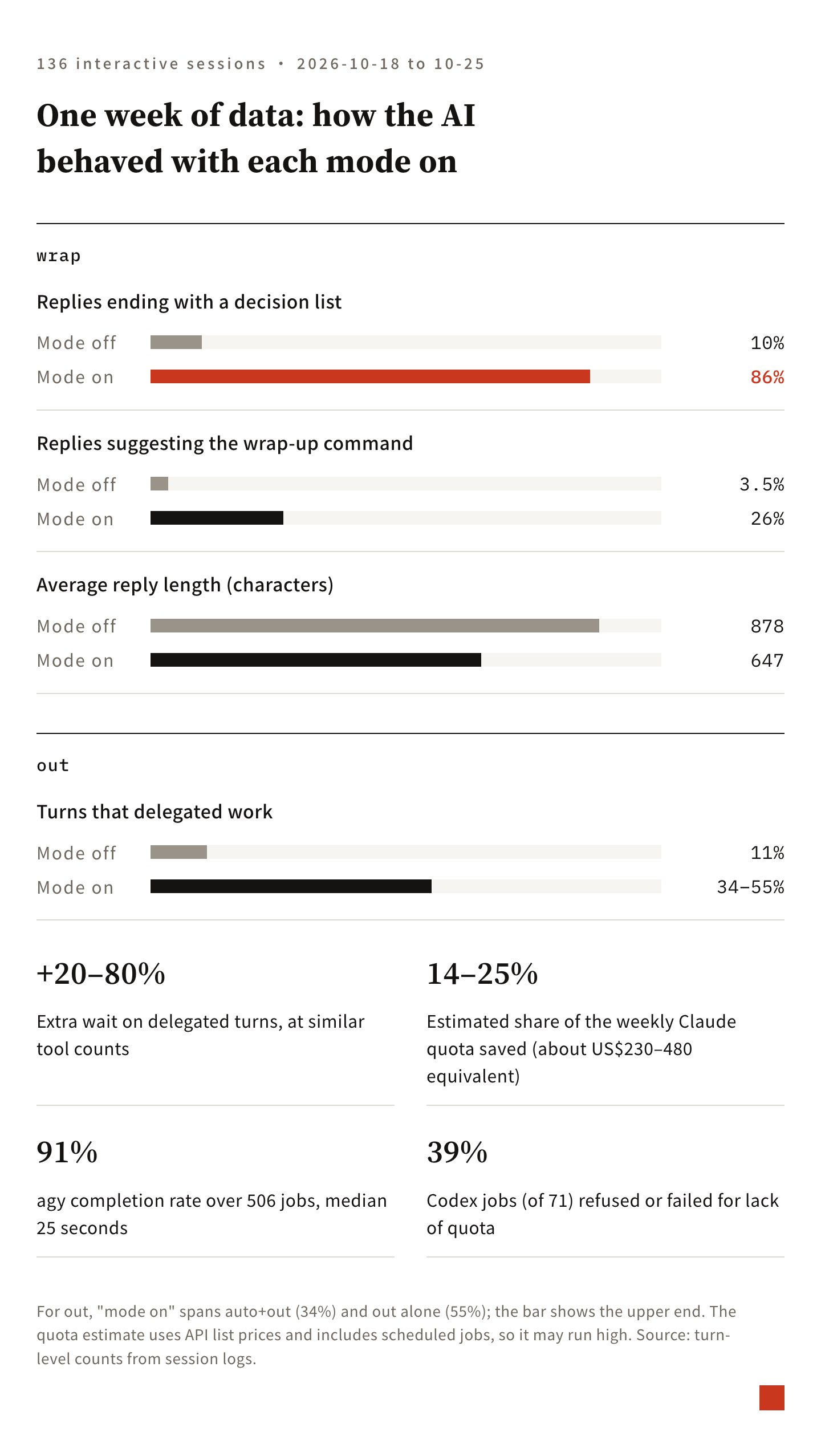
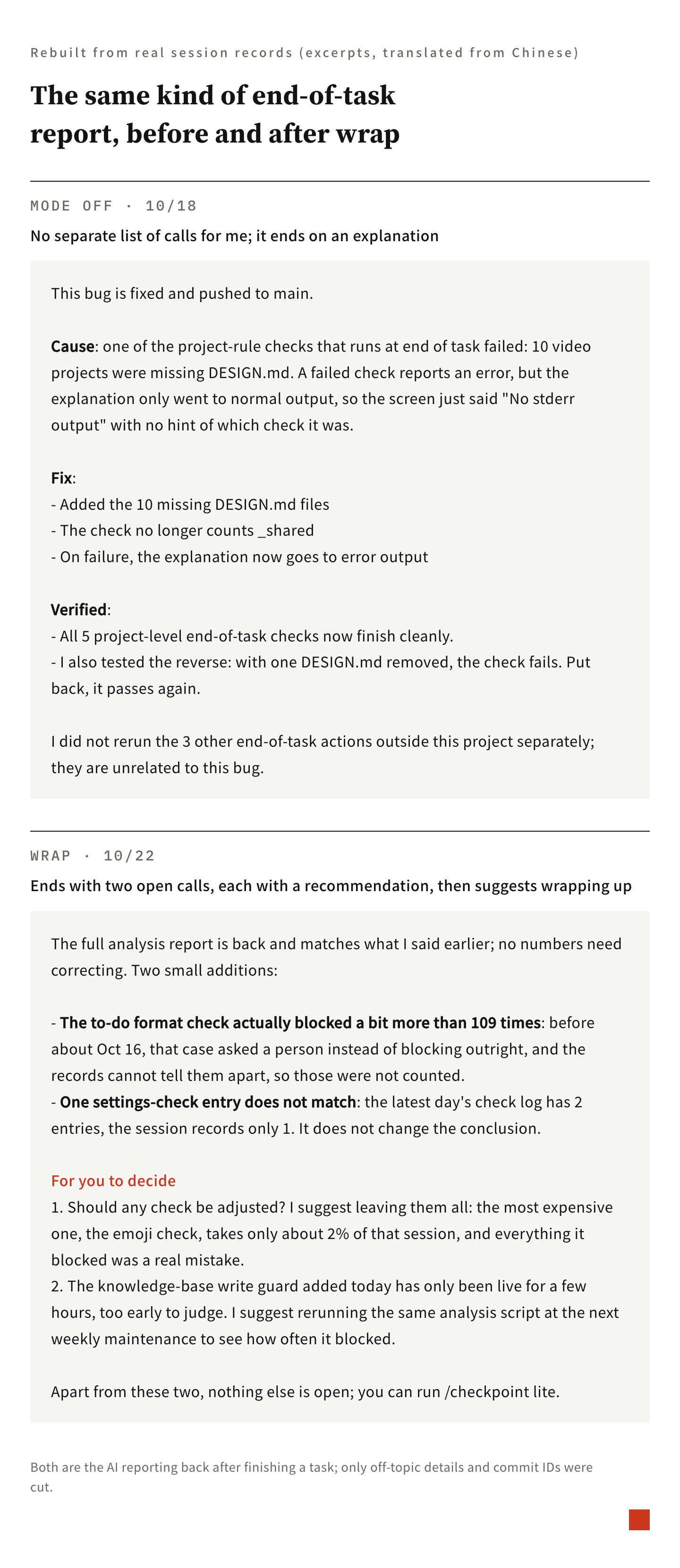
wrap had the clearest impact. The share of responses ending with a decision list jumped from 10% to 86%. Recommendations to run wrap-up commands rose from 3.5% to 26%. Replies also got shorter, dropping from an average of 878 characters down to 647 characters.
out worked, but it saved quota, not time. Turns involving delegation rose from the 11% baseline to between 34% and 55%. However, I mostly toggled out on when facing batch tasks, so task selection itself pushed this number up. The actual effect was likely a bit lower than the raw figures suggest.
I also checked whether delegation made me wait longer. Comparing turns with similar tool use counts, delegated turns made me wait 20% to 80% longer, showing no sign that delegation was faster. What it saved was Claude’s weekly quota: roughly US$230–480 worth, or 14% to 25% of Claude’s usage that week. This number is an estimate. Some delegated jobs were sent automatically by schedulers, and might not have been handled by Claude anyway. Subscription quotas also don’t map one-to-one to API list prices.
As for external service performance: agy ran 506 tasks that week with a 91% completion rate and a median latency of 25 seconds. Codex ran 71 tasks, and 39% of them were blocked by quota limits or failed. I decided to maintain the delegation ratio at its current level without raising it further. Pushing it higher would only make me wait longer, and Codex would hit quota limits even more frequently.
auto mainly worked by intercepting. That week, it caught 10 instances where the AI would normally stop to ask me, blocking the prompt directly so the AI resolved it alone—such as staging only files it modified for git commits. From the response text alone, the difference was barely noticeable because the baseline rarely asked questions to begin with. Prompt menus asking for my input averaged only 0.01 times per turn, and only 2% of responses ended with questions.
Issues discovered. Across 158 mode switches that week, I used the interactive menu every single time, never typing arguments manually. The old menu only allowed one selection at a time, so when I enabled auto first and then switched to wrap, auto was displaced. In the logs, turns with both auto and wrap enabled totaled 0. Out of the 28 remaining mode state files, 21 retained only wrap. The wrap-up phase is precisely when commits are most frequent and checks are most likely to trigger, yet auto was turned off right at that moment. That is why 0.4.1 switched to multi-select.
After updating /at, I tested switching twice within the same conversation. When switching to mobile, it replied in three lines with no tables. When switching back to desktop, the next response returned to diagrams and tables.
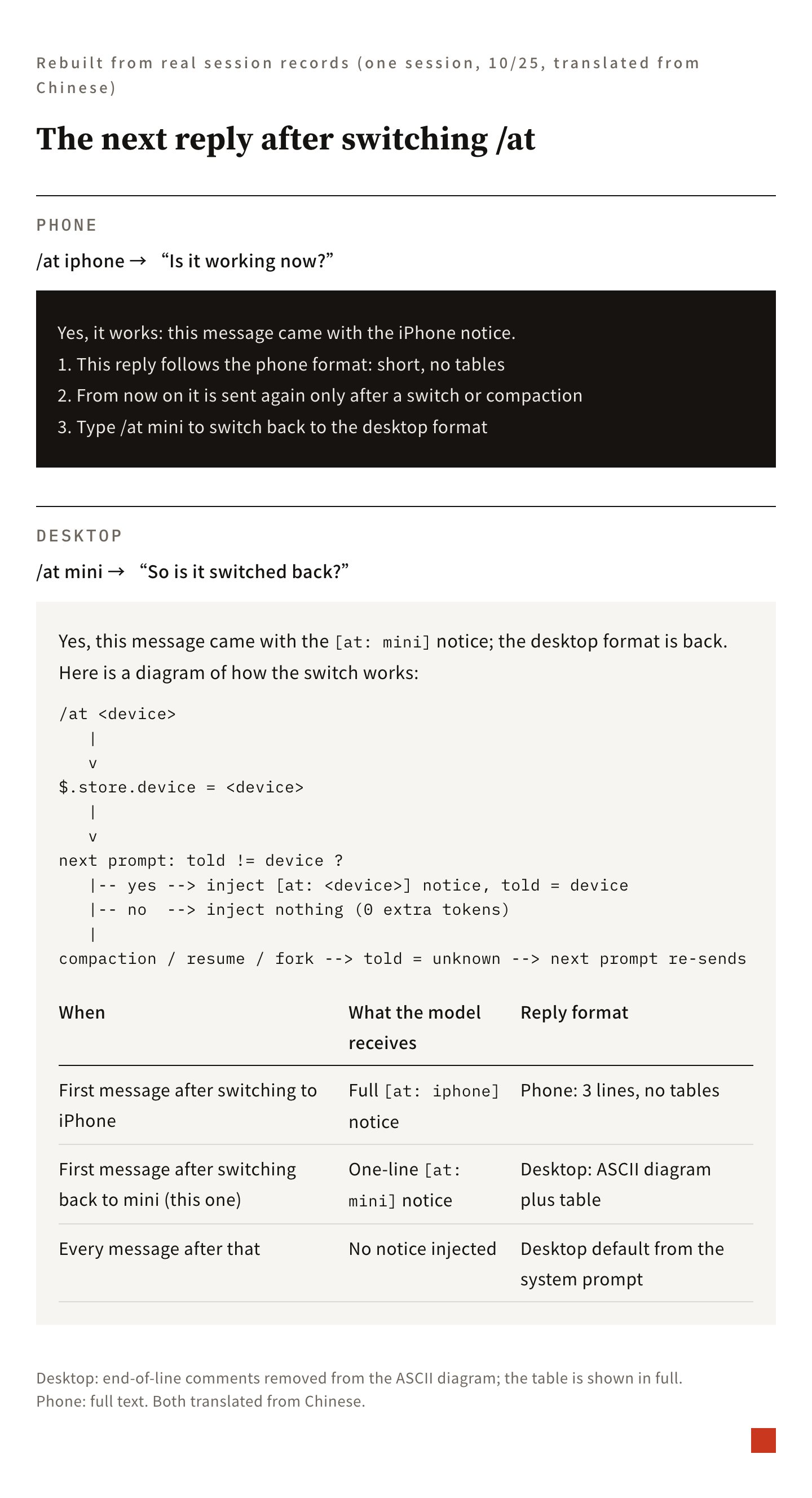
The video below demonstrates how the response format changes after switching modes.
Both the images and video were reconstructed from actual conversation logs, keeping only sections relevant to work-mode.
Prompts I Used During Development
Below are the exact prompts from key moments in the development process. After each excerpt, I included a note explaining how to adapt it to your own situation.
1. Find your most frequent repeated requests first
Also, shouldn’t mode include an option for not asking me along the way? Check /history-find to see if I say that often. This mode also needs to bypass existing hook restrictions that pause to wait for my confirmation. (translated from Chinese)
Adapt it to your situation: Swap “don’t ask me along the way” for whatever phrase you repeat most to the AI, and ask it to count occurrences in your chat history. Anything with high frequency is worth turning into a toggle.
2. Ask for reasons before adding rules
So based on current benchmark results, does the model simply avoid delegating, or is it due to the harness? Can you provide an in-depth analysis of both? (translated from Chinese)
Adapt it to your situation: When the AI doesn’t behave as intended, ask it to diagnose the root cause first. Check whether it’s the model’s default tendency or conflicting rules you wrote before deciding what to modify.
3. Bounce trade-offs back for discussion
I also have a dilemma right now: should we prioritize delegation efficiency or execution speed? Discuss it with me and give me your recommendation, okay? (translated from Chinese)
Adapt it to your situation: When two goals compete with each other (such as cost versus speed, or quality versus volume), ask it directly for recommendations and reasoning. Review the options, then make the call.
4. Keep rules to a minimum
I agree with your changes in principle. However, whatever goes into claude.md and other harnesses should be as concise as possible. If the model already knows how to do it, don’t include it (use the standard: “Would it still know if we removed this?”). (translated from Chinese)
Adapt it to your situation: Every time the AI wants to add a rule, ask: “If I remove this, would you still do it?” If it already does, leave it out.
5. Validate effectiveness with conversation history
I want to know if this mod genuinely altered model behavior. Use /history-find to pull conversations from the past week for analysis. (translated from Chinese)
Adapt it to your situation: After changing any configuration, wait a week and have the AI pull conversation logs to compare behavior before and after. If the command was ever renamed, give it the old name too, or it will miss data.
6. Adapt the interface to your habits
For modifications, I think letting me type the command with arguments in any combination or order is simplest. If mutually exclusive options arise, what do you think we should do? (translated from Chinese)
Adapt it to your situation: Tell it how you actually interact (clicking menus versus typing, when you toggle modes), and ask it to tailor the interface to your habits. If conflicting options occur, ask it to propose solutions.
7. Ask how much was saved
For delegation, help me calculate how much quota I saved. I know it’s hard to estimate, but gather as much data as possible to produce a reasonable estimate. (translated from Chinese)
Adapt it to your situation: For any setup designed to cut costs, ask it to estimate the quota saved. Also have it outline any uncertainties in the estimate.
8. Ask for cheaper approaches
Is there a way that doesn’t break the cache? Instead of injecting into the system prompt, what if it’s injected only into the latest turn after switching, or after compaction? (translated from Chinese)
Adapt it to your situation: When reminder content is static, ask if it can be sent only when needed, without repeating on every message.
Starter Prompt Template
If you want to build your own version, start with this template and replace the bracketed sections with your own details:
I want to build a working mode switch for Claude Code that toggles via a single command, with the active mode visible in the status line.

1. First, search my conversation logs from the past three weeks to find my most frequent repeated requests (e.g., "don't ask me along the way," "ready to wrap up," "offload this batch to another AI"), listing frequencies and exact quotes.
2. Design a mode for each of the top three categories. For each mode, specify clearly: how you behave when it is active, and what actions always pause for my approval regardless of mode (sending external communications, making payments, deleting unrecoverable data, changing permissions).
3. Keep rules as minimal as possible: leave out things you would already do by default.
4. I usually switch modes by (clicking a menu / typing commands); modes must support (multiple selection / arbitrary combinations). Provide your recommendations when options conflict.
5. I view responses on (desktop / mobile), so adjust formatting by device; send device reminders only once after switching.
6. After one week of use, compare behavior differences before and after toggling modes using conversation history, and estimate how much quota was saved.
Appendix: how it is built
This part is for readers who want to build their own. It uses the event and field names of Claude Code plugins (mods) directly, and follows the work-mode 0.4.1 source.
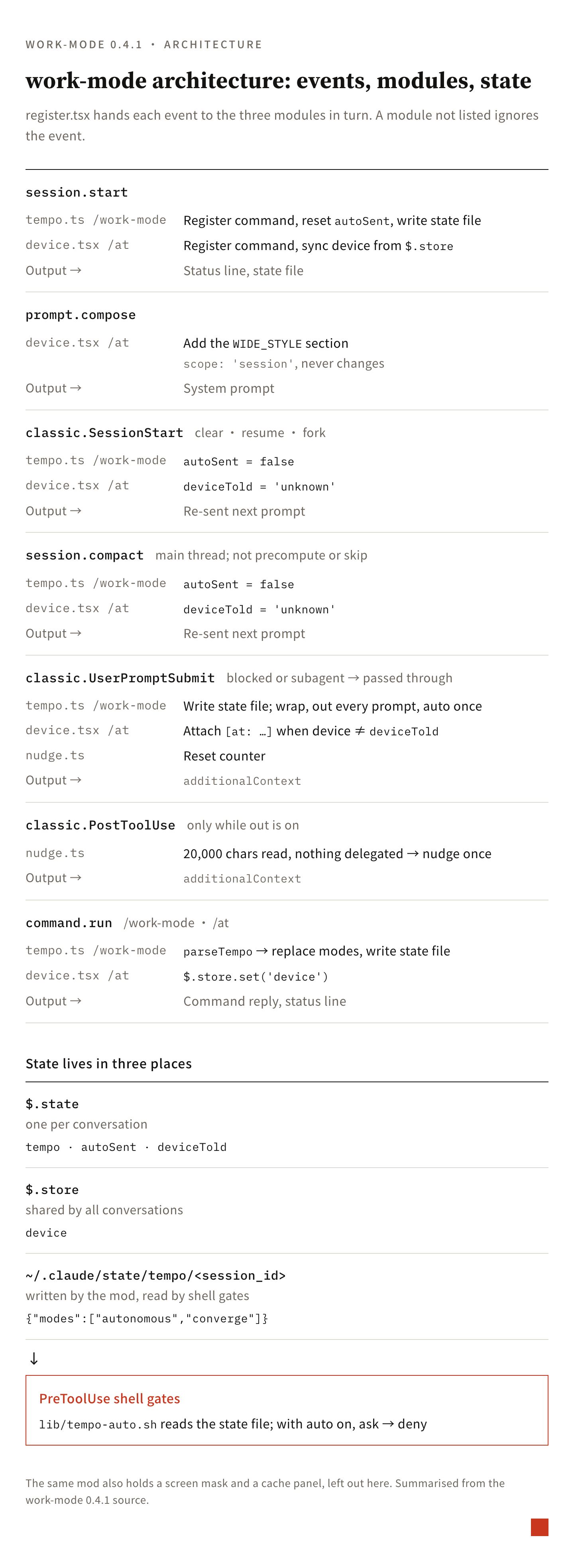
Architecture: one mod, five events
work-mode is a single mod with one entry file, register.tsx. The same mod also holds a screen mask and a cache panel, which this post leaves out. The working modes live in three files: tempo.ts handles /work-mode, device/device.tsx handles /at, and nudge.ts handles the delegation nudge. Any event that several parts need is hooked once in register.tsx, which then calls each part in turn.
| Event | When it fires | What work-mode does |
|---|---|---|
session.start | A conversation starts | Registers the /work-mode and /at commands, resets auto’s “sent” flag, updates the status line, writes the current modes to the state file |
prompt.compose | The system prompt is assembled | Adds one fixed “desktop reply format” section |
classic.SessionStart (clear, resume, fork) | A conversation is cleared, resumed or forked | Resets the “sent” state of auto and /at, so the next message sends them again |
session.compact | The conversation is compacted | Same reset once the main thread’s compaction completes; precompute and skipped compactions do not count |
classic.UserPromptSubmit | The user sends a message | Puts each mode’s reminder into additionalContext |
nudge.ts also hooks classic.PostToolUse on its own. It only acts while out is on; the out section below covers it.
The life of one message
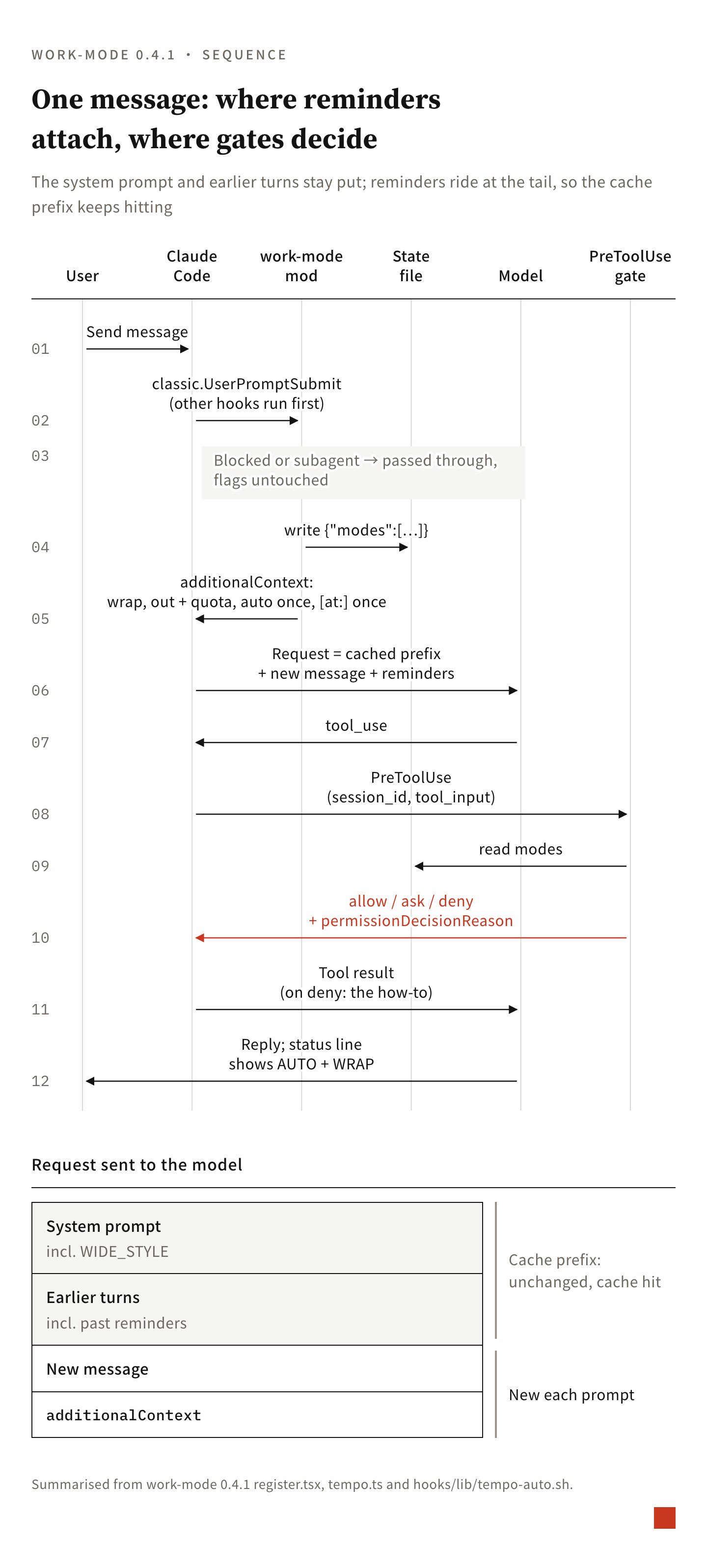
After a message is sent, it goes through these steps:
classic.UserPromptSubmit. The mod lets the other hooks run first (next(e)) and then looks at the result. If another hook blocked the message (blockorpreventContinuation), or a subagent sent it (it carriesagent_id), the mod passes it through and attaches nothing. A blocked message never reaches the model; marking a reminder as “sent” at this point would mean the retried message never gets it. So this step is skipped, and every pending reminder waits for the next message.- Build
additionalContext. What gets attached depends on the modes: wrap (internal nameconverge) on every message; out (dispatch) on every message, followed by one quota line; auto (autonomous) only on the first message after it is turned on, tracked by theautoSentflag;/atonly once, when the device differs from the one the model was last told about. These texts follow the user’s message and become part of the conversation history. - Model inference. The system prompt and earlier turns are unchanged; only the new message and its reminders are added at the end, so everything before them still hits the prompt cache.
PreToolUsegates. When the model calls a tool, the shell gates read the state file and return ask or deny (see the gate section below).- Reply. The status line (
$.ui.status) shows a label such asAUTO + WRAP.
Why not use prompt.compose to put the mode instructions into the system prompt? Two reasons. First, the system prompt is only rebuilt at compaction, so a mode switch mid-conversation would not reach it. The first version of /at worked this way, and an hour and a half after I switched back to the desktop, the model was still replying in phone format. Second, the system prompt sits at the very front of the cache prefix: change one character and the cache for the whole conversation after it has to be rewritten. So prompt.compose carries only one default that never changes (the desktop format, scope: 'session'), and everything that changes goes through additionalContext.
Where state lives
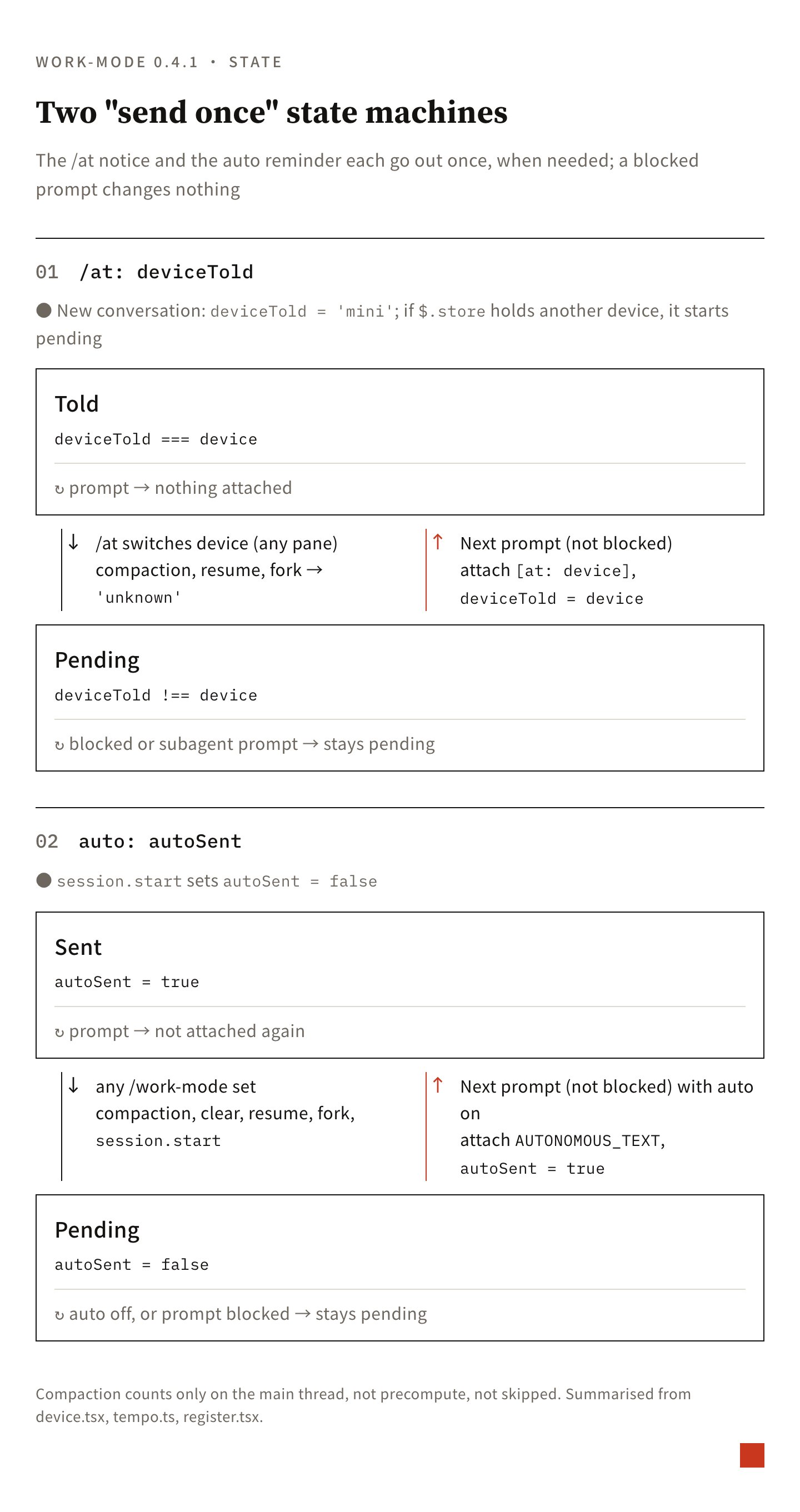
State lives in three places:
| Location | Contents | Written by | Read by |
|---|---|---|---|
$.state (one per conversation) | tempo (current modes), autoSent, deviceTold | the mod | the mod |
$.store (shared by all conversations) | device | /at | every conversation, synced at start and on each message |
~/.claude/state/tempo/<session_id> | {"modes":["autonomous","converge"]} | the mod | PreToolUse shell gates |
The modes live in $.state, so they never leak into other conversations open at the same time. Shell gates cannot read a mod’s $.state, though, so the mod also writes the modes to a JSON file named after the session_id. It writes at three points: when the conversation starts, on every message, and on every mode change. When all modes are off, the file is deleted rather than left empty; only if deletion fails does it write {"modes":[]}, which means the same thing to the gates. A failed write raises no error: a gate that finds no file keeps asking, which is the safe direction. The file uses the internal names autonomous, dispatch and converge, always in that order.
The /at device, by contrast, lives in $.store, so a switch made in one herdr pane reaches the other panes with their next message. Each conversation also keeps a deviceTold: the device the model was last told about. A new conversation starts at mini, because the system prompt’s default is already the desktop format. On each message, if the current device differs from deviceTold, the mod attaches an [at: …] notice and updates deviceTold. After a compaction, resume or fork, the old history may still hold a notice for any device, so deviceTold is set to unknown and the next message always sends the notice again, even when I am at the desktop.
Argument parsing and the exclusion rule
The words after /work-mode are lowercased and split on spaces, commas or +, in any order:
// tempo.ts parseTempo (excerpt)
const words = arg.toLowerCase().split(/[\s,+]+/).filter(Boolean)
if (words.length === 0) return { kind: 'status' }   // no arguments: open the menu
for (const w of words) {
  if (w === 'off') continue                         // off next to other words adds nothing
  const mode = WORDS[w]                             // auto→autonomous, out→dispatch, wrap→converge
  if (!mode) return { kind: 'error', message: `Unknown mode "${w}".` }
  picked.add(mode)
}
if (picked.has('converge') && picked.has('dispatch')) {
  picked.delete('dispatch')                         // out + wrap: wrap wins
  note = 'out dropped: wrap and out exclude each other, wrap wins (jobs already out still finish).'
}
const modes = ORDER.filter(m => picked.has(m))      // fixed order: autonomous, dispatch, converge
The result always replaces the current setting; it never adds to it. So off on its own turns everything off, and off out is the same as just out. When the exclusion rule applies, the explanation (note) is appended to the command’s reply.
With no arguments, the mod calls $.ui.ask to open a multi-select menu. The menu holds at most four options, and off only appears when some mode is on. The ticked labels are mapped back to the same words and handed to parseTempo, so typing and clicking take the same path.
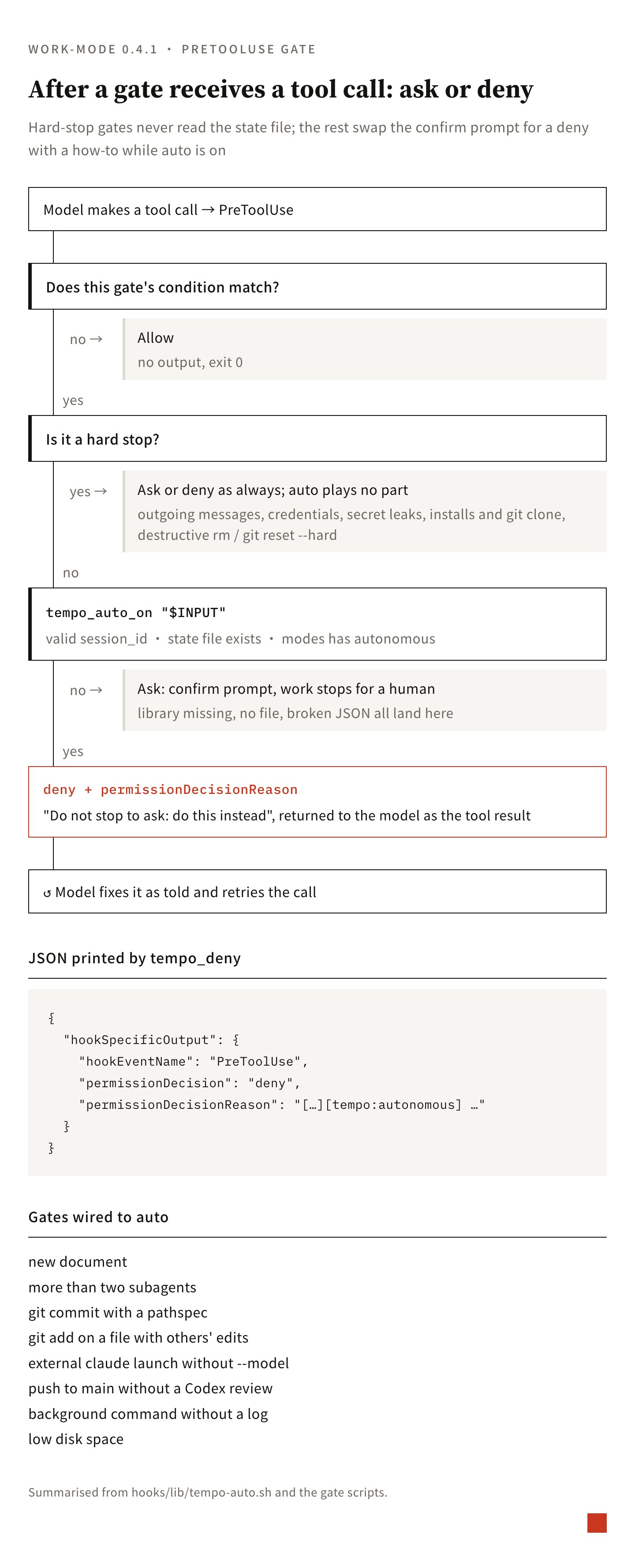
The auto gates: ask becomes deny
The gates are shell scripts on the PreToolUse event, sharing one library, hooks/lib/tempo-auto.sh:
tempo_mode_on() {  # tempo_mode_on "$INPUT" <mode>
  local sid f
  sid=$(printf '%s' "$1" | jq -r '.session_id // ""' 2>/dev/null) || return 1
  case "$sid" in ""|*/*|*..*) return 1;; esac   # reject empty ids and path escapes
  f="${TEMPO_STATE_DIR:-$HOME/.claude/state/tempo}/$sid"
  [ -f "$f" ] || return 1
  jq -e --arg m "$2" '((.modes // []) | index($m)) != null' "$f" >/dev/null 2>&1
}
tempo_auto_on() { tempo_mode_on "$1" autonomous; }
tempo_deny() {
  jq -n --arg r "$1" '{hookSpecificOutput:{hookEventName:"PreToolUse",
    permissionDecision:"deny",permissionDecisionReason:$r}}'
}
A gate wired to auto adds one check in front of the place where it used to return ask:
. "$(dirname "$0")/lib/tempo-auto.sh" 2>/dev/null || tempo_auto_on() { return 1; }
# …
if tempo_auto_on "$INPUT"; then
  tempo_deny "[scratch-doc-guard][tempo:autonomous] About to create $FP. … Do not stop to ask: put the content in the existing master file it belongs to …"
  exit 0
fi
# auto is off: return ask as before
The difference between ask and deny is on the model’s side. Ask opens a confirmation prompt, and the whole run stops until the user answers. Deny opens nothing; permissionDecisionReason goes straight back to the model as the tool result. The reason says “do not stop to ask, do this instead”, and the model fixes the call as told and sends it again. If the library fails to load, tempo_auto_on always returns false and the gate keeps asking.
Gates wired to auto today: creating a new document (scratch-doc-guard), dispatching more than two subagents at once (agent-dispatch-guard), git commit with a pathspec, git add on a file that already has other unstaged edits, launching claude externally without --model, pushing to a main branch that auto-deploys without a Codex review on record, background commands without a log, and low disk space.
Hard-stop gates never load tempo-auto.sh: outgoing messages (Slack, LINE, Gmail), reading or writing credentials, commands that look like secret leaks, installing packages and git clone, and destructive rm and git reset --hard. These gates ask or deny exactly as before, whether auto is on or not. Payments have no dedicated gate yet; they are held back by the hard-stop list in auto’s reminder text.
out: the quota table, the 90% handoff, and the nudge
out attaches two parts to every message: the delegation rules and one quota line. The quota comes from ~/.claude/usage-cache/ai-quota.json, which a separate ai-quota script rewrites every time it runs. The handoff threshold (FLOOR = 90) lives only in ai-quota, which marks each pool’s row with a route: open, floor_5h or floor_7d. The mod does not compute the threshold itself; it only checks whether route starts with floor_. If that row’s route_reset_ts has already passed, the window has reset and the table is simply stale, so the pool counts as open.
From the two pools’ states, the quota line reaches one of four conclusions: both open, route as the rules say; agy past the threshold, send its work to codex; codex past the threshold, send its work to agy, or else to a sonnet subagent; both past, keep the work in the main thread and do not call ext-run. If the table cannot be read, only the delegation rules are attached, and ext-run checks the threshold again before it sends anything.
nudge.ts hooks classic.PostToolUse. Once the main thread’s Read, Bash and Grep output in the current turn adds up to 20,000 characters (adjustable with DISPATCH_NUDGE_CHARS), and nothing has been delegated yet (no Agent or Workflow call, and no ext-run, codex exec or agy in any Bash command), it attaches one nudge. It fires at most once per turn and resets when a new message is sent; subagent tool calls do not count.
Tests and verification
The mod’s tests use the Claude Code plugin test framework (claude-code/testing) without opening a real conversation. Each test first replaces the engine events with fakes: fs.write writes into an in-memory object, process.run deletes from that object when it receives rm, ui.status records every status line, and classic.UserPromptSubmit returns a result the test controls. The test then calls $.command.run, $.classic.UserPromptSubmit, $.session.compact and $.classic.SessionStart directly and checks the contents and order of the additionalContext array.
For example: auto is attached on the first message and not the second, attached again after a manual compaction, but not after precompute; the /at notice survives a blocked message and is sent again after a resume even at the desktop; after off, the state file is deleted and the status line cleared. check.sh runs type checking, claude plugin validate and claude plugin test in one go.
The turn counts from the week of testing came from a script that reads the JSONL conversation files Claude Code stores, turn by turn: which modes were on, whether the reply ended with a decision list, whether work was delegated, and how many tools were used. Turns with every mode off served as the baseline.
Build your own: wrap alone, the minimum version
wrap alone needs four pieces:
- A command (
command.run) that flips one boolean in$.state. - A
classic.UserPromptSubmithandler: while the value is true, it puts a fixed text intoadditionalContext, skipping blocked messages and subagents. - The reminder text: open no new work, end each reply with the decisions that need the user, each with a recommendation, and suggest wrapping up once nothing is open.
- One
$.ui.statuscall so the status line shows WRAP.
wrap needs no state file, because no shell gate reads it, and no one-shot flag, because it goes out on every message anyway. The state file and gates only come in when you add auto. Below is a draft condensed from the work-mode code; it has not been run through tests on its own:
import { atom, read, update } from 'claude-code'
import type { Register } from 'claude-code'

// Also declare PluginState['my-wrap'] = { on: boolean } in your types, and point hooks.json at this file
const wrapOn = atom({ plugin: 'my-wrap', key: 'on' } as const, false)
const TEXT = '[wrap] Open no new work; finish what is open. End each reply with the decisions that need the user, each with a recommendation; once nothing is open, suggest wrapping up.'

export const register: Register = on => {
  on('session.start', async ($, e, next) => {
    await $.command.register({ name: 'wrap', description: 'wrap on | off', immediate: true })
    return next(e)
  })
  on('command.run', { command: 'wrap' }, async ($, e) => {
    const v = e.args.trim() !== 'off'
    await update($, wrapOn, () => v)
    $.ui.status(v ? 'WRAP' : undefined)
    return { text: v ? 'wrap on' : 'wrap off' }
  })
  on('classic.UserPromptSubmit', async ($, e, next) => {
    const r = await next(e)
    if (e.agent_id || r.block || r.preventContinuation || !(await read($, wrapOn))) return r
    return { ...r, additionalContext: [...(r.additionalContext ?? []), TEXT] }
  })
}