On this page
Over the past two weeks I did two things that pull in opposite directions.
The first was burning quota. When I took stock, I found a pile of free, resetting, or soon-to-expire credits: Claude cloud credit, the Console API promo, Colab compute units, and the weekly subscription allowance. If I didn’t use them, they’d just disappear.
The second was spending that surplus on things that save quota later: cleaning up my knowledge base, stopping my settings from drifting apart, making rules load only when needed, and turning routine work into scheduled jobs.
A lot of people have been asking me how to burn quota and how to save it, so here it is in one post. In order: how I took inventory, how I decided what to spend it on, what I actually did, what I expect to get out of it, and finally prompts you can copy if you want to do the same.
Want AI working in your own job, not just in demos? See the 3-month 1-on-1 program →
How I took inventory
I pay for three subscriptions, about US$125 a month in total:
- Claude Max 5x, $100
- Codex Plus (ChatGPT Plus), $20
- Google AI Pro, $4.99 promotional price
What actually got me to take inventory was everything that comes bundled with them. Max 5x includes a $100 monthly API promo, claude.ai gave me $250 of cloud session credit, and Google AI Pro includes 200 Colab compute units (CU) a month. Each one has different rules. Some expire at the end of the billing cycle, some are one-time, some expire after 90 days.
The method was simple. I had Claude Code open a browser, visit each settings page, and put the balance, reset time, expiry date, and what it can be used for into one table. I did it once on 10/10 and rechecked all seven pools on 10/20:
| Pool | Resets / expires | What it can be used for |
|---|---|---|
| Claude Max 5x subscription | 5-hour windows plus a weekly cap, resets Sunday | Main sessions, subagents, overnight batches |
| Claude cloud credit, $250 | One-time, expires 11/05 | Cloud sessions only; can’t touch local files or credentials |
| Console API promo, $100 | One per billing cycle, expires at the end, doesn’t roll over | API, Agent SDK, scheduled jobs running claude -p with an API key |
| Codex Plus | 5-hour plus weekly, often resets early without notice | Coding work, adversarial review |
| agy (Google AI Pro) | Three model groups, each with weekly and 5-hour caps | Long-document summaries, transcription, second opinions |
| Colab CU | 200 a month, each batch expires after 90 days | Training and heavy batches my machine can’t run |
| Local models (Mac mini) | Free, only limited by time slots | Overnight batches, sensitive data that can’t go to the cloud |
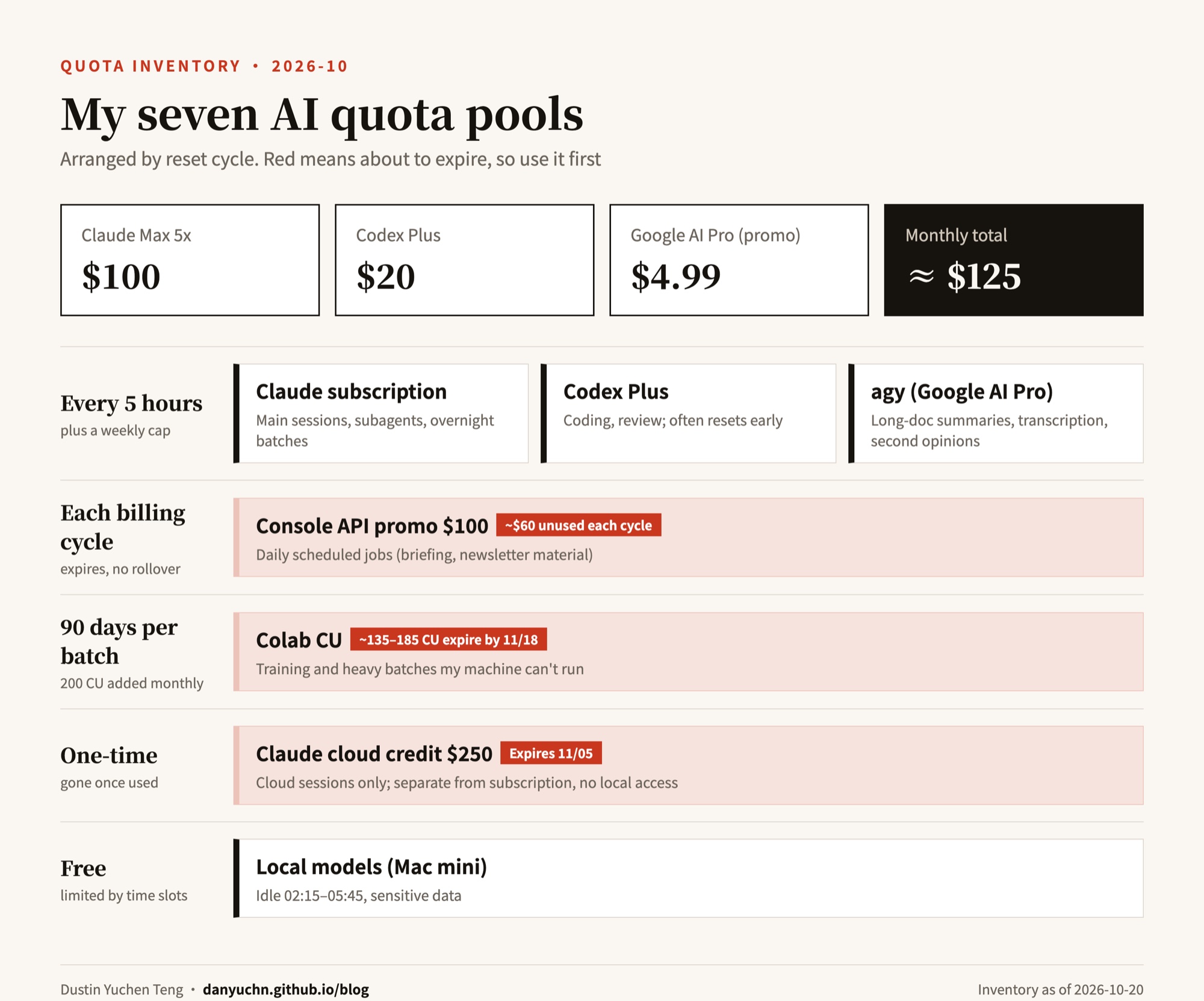
At the end I had Claude write a small command that shows most of the remaining balances in one line. Cloud credit and the Console promo can’t be read that way, so I still check those on the web.
How I decided what to spend it on
Before the weekly reset on 10/16, I still had more than half my allowance left. I asked Claude to look at how people on Reddit and elsewhere spend quota “meaningfully,” then match that against my own situation.
There’s a thread on r/ClaudeCode about wasting Max quota every week, and one person put it well: if the output needs a human to review it, you’re just creating more work for yourself.
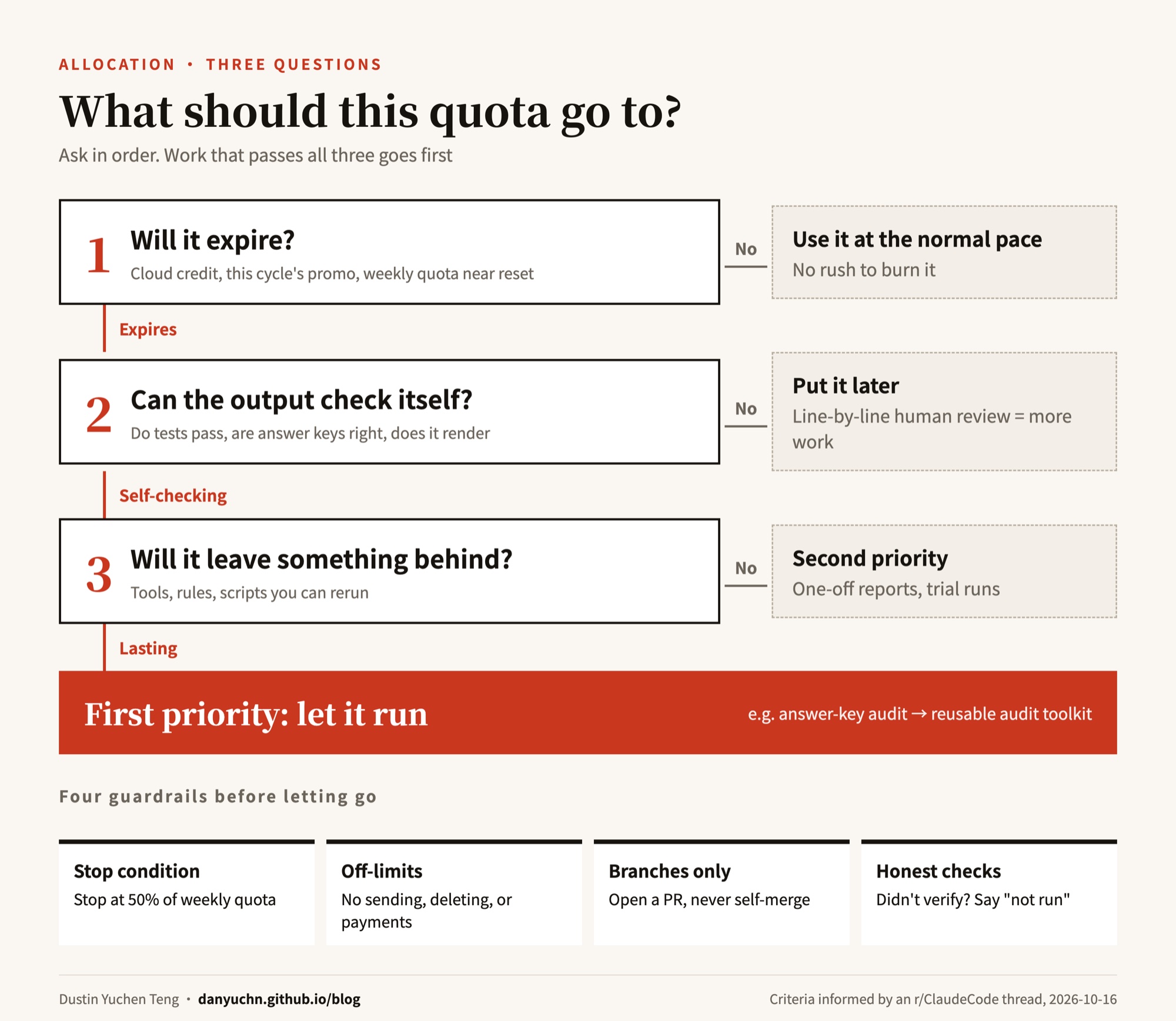
So I settled on three questions, asked in order:
- Will it expire? Use what expires first. Cloud credit, this cycle’s Console promo, and weekly quota close to resetting go to the front.
- Can the output check itself? Whether tests pass, whether answer keys are right, whether a video renders. Let the machine judge those. Output I’d have to read line by line goes to the back.
- Will it leave something behind? Tools, rules, scripts I can rerun. One-off reports go last.
With those rules set, I decided what each pool would handle. This is the split Claude and I worked out on 10/20:
| Pool | Handles | Rule |
|---|---|---|
| Claude subscription | Main sessions, work that needs judgment, final review | Every route ends with Claude as the fallback |
| Cloud credit | Large batches that don’t need local credentials | Always push to a branch and open a draft PR, never merge; use it up once and stop |
| Console promo | Daily scheduled jobs | Falls back to the subscription when the credit runs out |
| Codex | Coding work whose output a test or checker can judge, adversarial review | Falls back to Claude on failure or when it hits its cap |
| agy | Long-document summaries, transcription, second opinions | Keep 10% of each weekly group for my own use; stop sending work at 90% |
| Colab | Training, heavy batches my machine can’t handle | Spend in priority order, expiring batches first |
| Local models | Early-morning idle hours, resumable jobs, sensitive data | Only runs 02:15–05:45, with memory and swap guards |
What I actually did, and how
The half I burned
Letting it work through a whole batch while I slept. On the night of 10/19, before bed, I told Claude: you can open several windows and split the work up yourself, don’t stop to ask me, the less you bother me the better. It worked from 11 p.m. until a little after 6 the next morning and stopped itself once half the weekly allowance was gone.
Most of the work was for my own GMAT practice platform. The most representative task: it checked every one of the 18,000-plus questions on the platform and confirmed that not a single one marks a student wrong when they answered correctly.
Then it had another model redo nearly a thousand reasoning questions from scratch and only passed me the ones where the two sets of answers disagreed. In the end, I had 8 questions to judge.
When I got up, it had already sorted everything that needed my call into ten items. I answered them in one go, and what was ready went live.
One-time cloud credit: catching mistakes in my course materials. This credit only works in the cloud and is gone once used. I pointed it at my Claude Code course materials and had it compare them section by section against the official docs, looking for anything wrong or out of date. It found 11 spots, and I reviewed them before making changes. The cloud session can’t touch anything on my computer, so I’m more comfortable handing it this kind of job.
The monthly API credit: running my daily reports. Every morning I get a briefing that AI puts together, and every day it also collects material for my newsletter. Both used to eat into my subscription allowance. I moved them onto the $100 monthly API credit that comes with Max. It costs about $36 a month, and spot checks show the quality hasn’t dropped. That leaves my subscription allowance for daytime work.
Google’s Colab compute: training my own small models. I used it to train a few small models to see if they could replace paid services on my own machine. The speech-to-text one worked, so I’m using it now. The one meant to imitate my writing voice lost a blind test to my current setup, so I deleted it. I also tried an open-source AI video model and made a 44-second clip with dialogue.
Testing a new model on my own work. When Haiku 5.5 came out, I wrote 13 test questions from work I actually do and spent about $15 worth of quota running them. For “check whether this is right” work, the cheap Haiku did as well as the expensive models, at roughly a tenth of the cost. I now send that kind of work to Haiku.
The half I spent on saving
Cheap work goes to cheap models. Checking goes to Haiku, coding and fault-finding go to Codex, long documents go to Google’s models, and anything my own computer can run happens overnight. Whichever route a task takes, anything that fails comes back to Claude.
Making the AI read less every time. Before every conversation, the AI first reads a stack of rules and background I’ve written for it, and the more it reads, the more it costs. I did two things. First, long conversations now compress earlier; comparing before and after, each conversation reads about 30% less. Second, I split out rules that only matter for specific tasks so they’re read only when needed. In the free settings pack I publish, the part that gets read every time shrank by more than 80%.
To run the numbers for the 11 days before and after: I have Opus 5.5 set to auto-compact at 400k, and here is how the 11 days before and after compared:

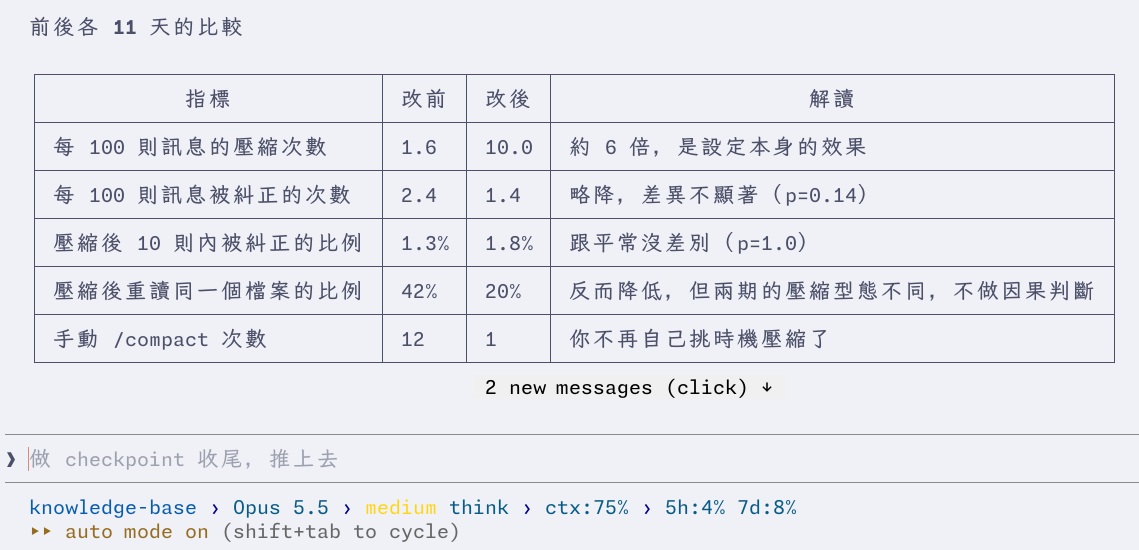
Why it saves money: every call resends the whole context. Once 1M context arrived, the ceiling that used to force a compaction was gone, so when a conversation grows to 500k, even a short reply eats 500k tokens. I wrote up the full story when I logged the quota incidents: Where the quota actually goes.
I think 400k is the sweet spot.
Too many rules made things slower. On 10/21 it felt like Opus had gotten dumber, so I asked Claude to go through that day’s conversations and find out why. The model hadn’t gotten worse. My own “outsource whenever possible” rule was fighting with my other rules. I removed it and replaced it with “if I’m waiting on something, do it the fastest way.”
Keeping my data from getting messier. I use both Claude Code and Codex, and their settings drift apart easily. My notes also tended to record the same fact in two places, and later one would get updated while the other didn’t. Now a weekly scheduled job compares and fixes these automatically, and rolls back anything a fix breaks.
Turning daily chores into scheduled jobs. There are now 17 scheduled jobs running on my computer every day. A few examples:
- Drafting Reddit replies every morning, so I only have to say which ones to post
- Preparing a diagnostic slide deck as soon as a student’s new score report arrives
- Writing a fix whenever my platform throws an error, ready for me to review
- Picking long jobs back up once quota resets, then notifying my phone when they finish
- On Sunday, if a lot of quota is left before the reset, picking tasks that don’t need me and running them
All of these only get things ready. Anything that gets posted or sent still waits for me.
Finding what I keep repeating. I asked Claude to go through the thousand-plus messages I’d sent it over two weeks and find requests I kept repeating. It picked out 8 that could be automated, and I’m working through them.
Not trusting the AI when it says “I checked.” Once, the AI in one of my scheduled jobs said it had checked the links when it hadn’t run anything at all. Now a script does those checks itself, and if the AI claims to have checked something without leaving a record of the check, it gets blocked.
What I expect to get out of it
| Effect | In plain terms | Status |
|---|---|---|
| Same work, lower cost | Checking work moved to a cheaper model, at roughly a tenth of the cost | Tested |
| AI reads less each time | About 30% less per conversation, worth roughly $600-plus a month at API prices | Compared before and after |
| Subscription saved for daytime | Daily reports now run on the monthly API credit, about $36 a month | Running fine for several days |
| Fewer things I have to remember | Reddit replies, newsletters, and score report analysis are prepared automatically | Running |
| Shorter reminder list | The “could do now” list went from 61 items to the 1 that’s actually doable | Running |
| Two tools stop contradicting each other | Mismatches between Claude Code and Codex settings cleared to 0 | Done |
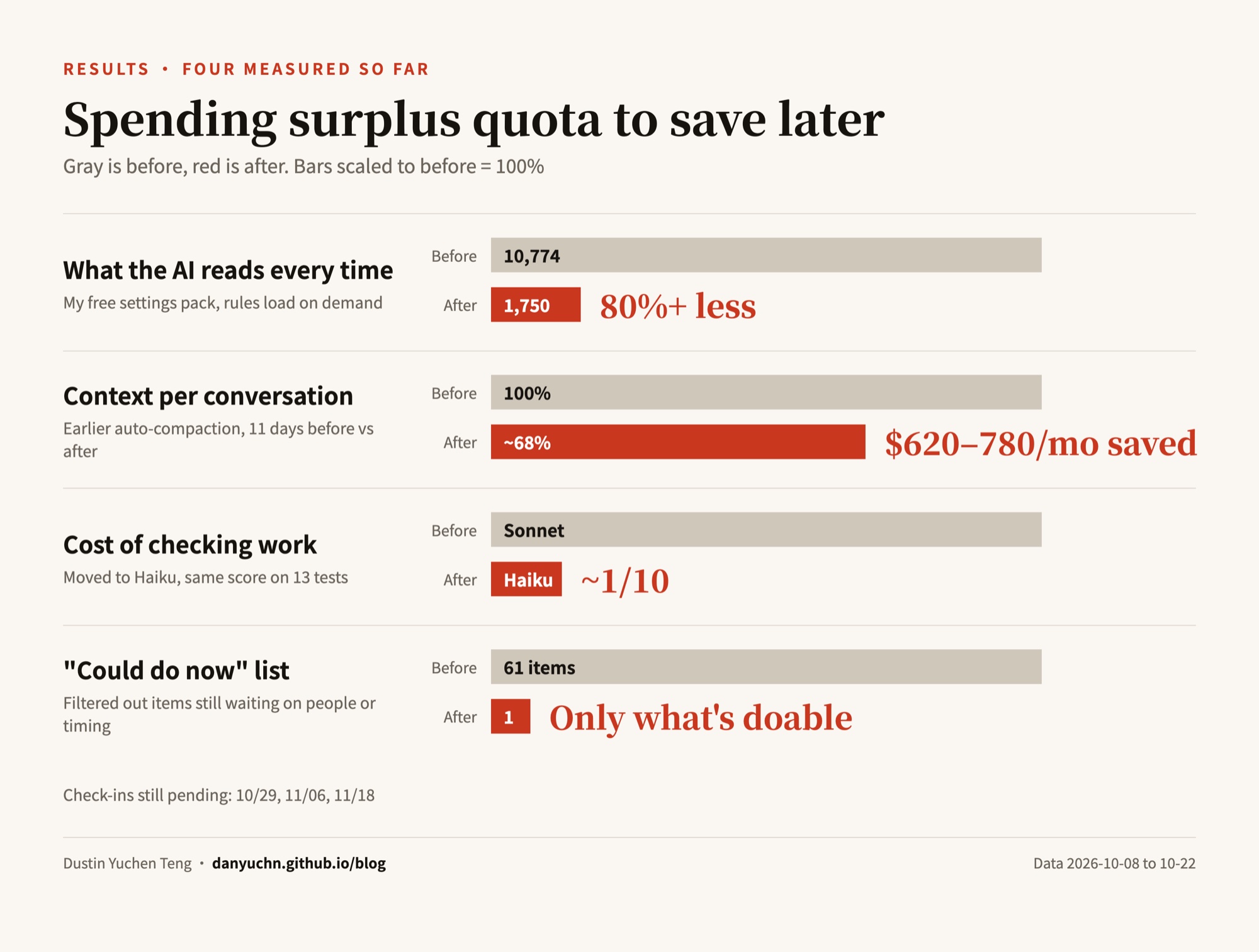
Some effects take a while to show up. I’ve scheduled three check-ins, on 10/29, 11/06, and 11/18, looking at two things: whether the AI is really costing less, and whether things I’m waiting on get done faster. If they haven’t improved, I’ll keep adjusting.
What’s still unspent, and what I plan to do with it
Even after this round, some is left, and a few pools are about to expire:
- Console promo: my three scheduled jobs use only about $40 a month, so around $60 expires each cycle. Before 11/09 I’ll check the balance and use it on batch jobs that can go through the Batch API.
- Colab CU: roughly 135–185 CU will expire before 11/18. Following the order I set, I’ll first use the speech-to-text model I just trained to re-transcribe old recordings, then move synthetic-query generation for my search model onto Colab.
- Cloud credit: expires 11/05. It’s one-time, so I’ll use it up and stop, without building any scheduled jobs for it. When local quota is tight, it goes to large batches that don’t need local credentials.
- Codex: it resets early so often that I don’t pay much attention to what’s left. I spend it freely, but the output has to be something a test can judge, or it goes through Claude’s review.
- Local idle hours: 02:15–05:45 goes to rough transcript cleanup, document sorting, and de-identification, the kind of batch that can resume after interruption and gets looked at again later.
That said, I won’t use quota just for the sake of using it up. Rushing to max out usage before a reset is mostly anxiety that subscription pricing is designed to create. I wrote about this in Which Claude Code plan to pick. If there’s no work that qualifies, I let it expire.
If you want to try it: prompts you can use
I did every step above by talking to Claude Code normally, without writing any special code. These are the lines I think matter most. Adapt them to your own situation and paste them in.
Step 1: Take inventory.
Open a browser, go to the usage page for each of my AI subscriptions, and put every credit’s remaining balance, reset time, expiry date, and which tools it works with into one table. If you can’t find something, write “not found.” Don’t guess. At the end, flag which ones expire within 30 days.
Step 2: Decide what to spend it on.
Sort my to-dos and long-term plans using these three questions: one, will the quota it uses expire; two, can the output be judged right or wrong by a test or checker, without me reading it line by line; three, will it leave behind tools or rules I can reuse. Put anything that passes all three first and list them for me to choose from.
Step 3: Let it run.
Do this batch on your own. I’m going to sleep, so don’t stop to ask me. Rules: stop when weekly usage hits 50%; verify each item yourself when it’s done, and if you didn’t run the check, write “not run”; don’t do anything that sends messages outside, deletes data, or touches payments. List those for me instead. Keep all changes on a branch and don’t merge.
Step 4: Review in the morning.
List everything you finished last night. For each one, include how you verified it, the result, and anything I need to decide. Number the decisions so I can answer them all at once.
Step 5: Start saving.
Go through my conversations from the past two weeks, find requests I’ve repeated more than three times, and rank the top five most worth automating, with a rough estimate of how many interruptions each would save.
Check my always-loaded settings (CLAUDE.md, rules), find sections that only matter for certain kinds of tasks, move them into skills that load on demand, and leave a one-line pointer in the always-loaded file.
I want to move checking work to a cheaper model. First write 10 test questions from my real work, run them on both the cheap and the expensive model, and only switch if the scores match. Otherwise keep the current one.
Every scheduled job needs a way to notify me when it fails, and any job using an outside model should fall back to Claude automatically when that quota runs out.
That’s it.