On this page
This post is about how I give spoken instructions to AI. The point is not precise wording. It is a few fixed moves: say why, draw a line around what it may and may not touch, let it ask first, and tell it to write things down when you are done.
Below I cover the four snags I started with, what I settled on, the numbers from this set of records, 8 lines I have actually said, and a starter prompt you can paste to an AI to run. If you want to know how I pulled these quotes out of transcripts and checked them, jump to the appendix: how I pulled this together.
Want AI working in your own job, not just in demos? See the 3-month 1-on-1 program →
What was bothering me
The first snag was instructions with no purpose. A student asked an AI to list what could be cleared from a computer, with no target amount in the request. I had them redo it by stating the purpose first, then asking for the list:
I think my goal is, to clear 10, at least 15 GB of space, so list for me what can be cleared safely.
(translated from Chinese)
The second snag was an AI that keeps stopping to ask, so a person has to keep watching. I described my own change in class:
I used to watch it and say, if something comes up midway, come back and ask me. Now I don’t need to.
(translated from Chinese)
The third snag was students who do not dare say they don’t understand. Most are too embarrassed to admit they cannot follow an AI’s output. In class I once said out loud, “I don’t understand this, is it mahjong?”, and only after that did students start speaking up.
The fourth snag was the same mistake coming back. Something I corrected once showed up again in a new conversation, because nobody wrote it down. What I do now is keep a list of rules the AI must always follow, which it reads before every job. But writing every complaint into that list makes the rules pile up and get messy. My line in class was that no country amends its laws every day.
What I wanted, and how it changed
I want to treat an AI as a very capable colleague who does not know what is in my head. Say why, set the range, let it ask first, then let go. If I don’t understand, say so. If I see a mistake, tell it to find the cause and write it down.
My own instructions are almost all long sentences typed by voice: spoken, full of filler, sometimes corrected halfway. I said this in class:
I usually just talk, and if I say something wrong, I still keep talking, because it can tell which parts I got wrong and which parts I corrected later.
(translated from Chinese)
So what works is not the wording. It is the 13 fixed moves in the four stages below.
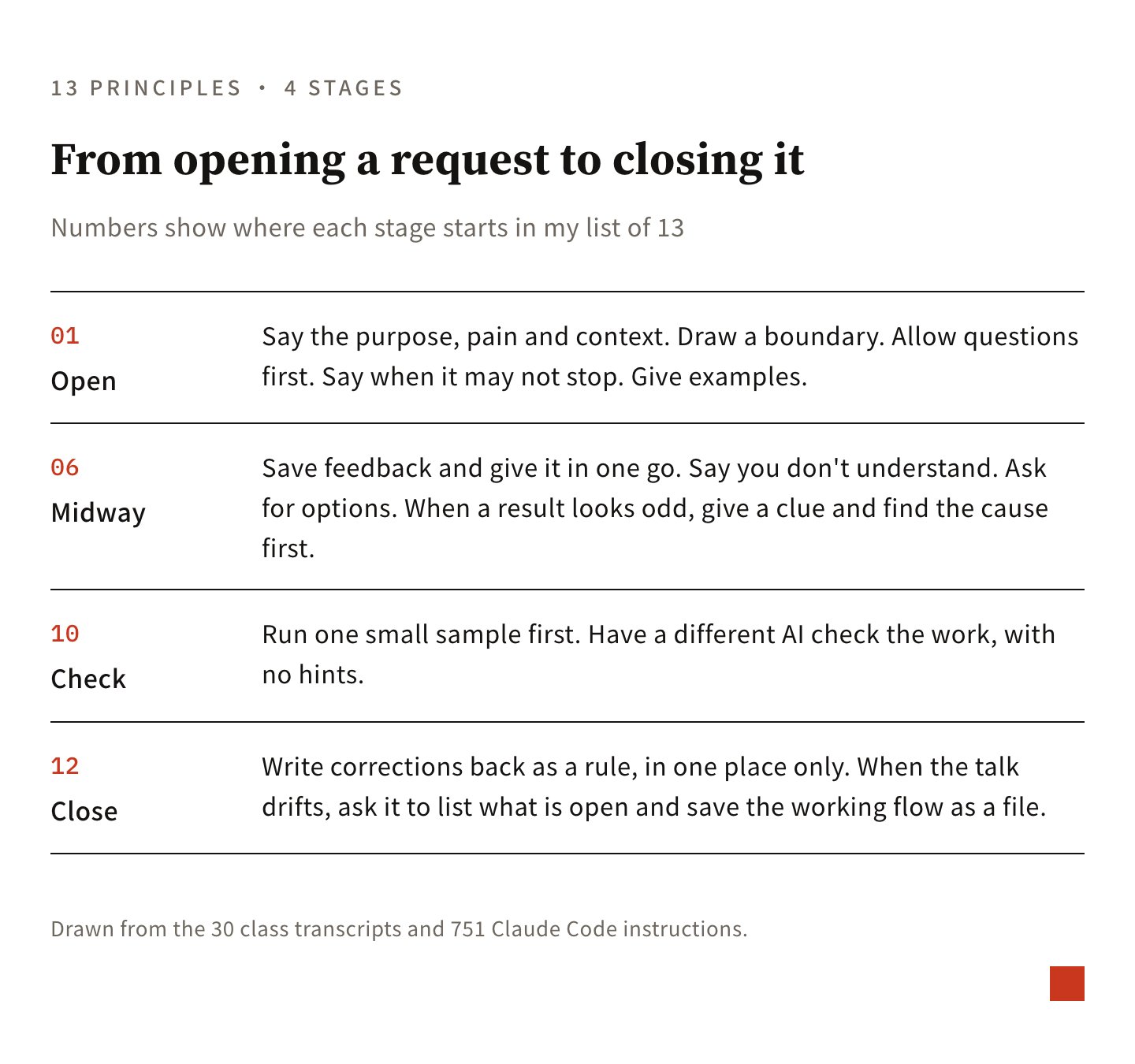
The turning points of the last few months, limited to what helps a reader:
9/18. Three things happened the same day. First, an AI was explaining a revision plan to me and I could not follow, so I asked for an example (“change two” and “dual track” in the quote are item names from that plan): “I still don’t get change two, the dual track. Give me an example with one or two imaginary test takers and 5 questions so I can understand.” I later turned that into a line I can call up any time, telling it to explain again in plain language a high schooler could follow. Second, when a discussion dragged on, I had it write what we had settled into a document as we went: “Our conversation needs to converge more and more, so you need to keep a document. The parts I agree with and have no doubts about, write to the file.” Third, for checking the work I started bringing in a second AI whose only job is to find faults, without telling it where I think the problems are.
10/1. Before touching a website that is already live and in use, I set the priorities first: “Please remember, first priority is the site must not go down, second priority is don’t lose data.”
10/4. Before closing a session I now always ask: “What did I correct you on this time?”
10/6 to 10/21. I started doubting the rules themselves. On 10/6 I asked, “Will this make the rules more bloated?” On 10/19 I asked that each rule be written in only one place: “write it in one place only.” On 10/21 I added a test: anything the AI already knows does not belong in the rules (“the model” in the quote just means the AI): “If the model already knows it, don’t include it (the test is: would it know without this).” The same day I put my line on letting go into one sentence: messages to other people and promises made to them are the last things I hand to the AI. “Outward messages are the last thing I let go of. Everything else can be let go first, and I’ll fix it if something goes wrong.”
What these records show
First the scope and baseline. There are two sets of material: transcripts of 30 one-on-one and company classes from April to October 2026, and 751 commands I typed to AI myself in my own work from June to October. For the transcripts, I had an AI pull out the commands I demonstrated in class, about 1,350 items. Then a script checked each original quote against the transcript, and 13 did not match. All 13 were dropped. I did not run a before-and-after comparison, so what follows is what came out of the sorting.
Slips of the tongue do not hurt. My commands in the transcripts are full of filler and slips, and they still worked. The mistake people new to AI make most is thinking a command must be precise. What to practice is whether the 13 moves above show up.
Commands in class are short, my own are long. In class it is mostly one thing at a time, because students must follow it and copy it. In my own work one message often hands off four or five jobs, separated by slashes or numbers, and the range I authorize is much larger.
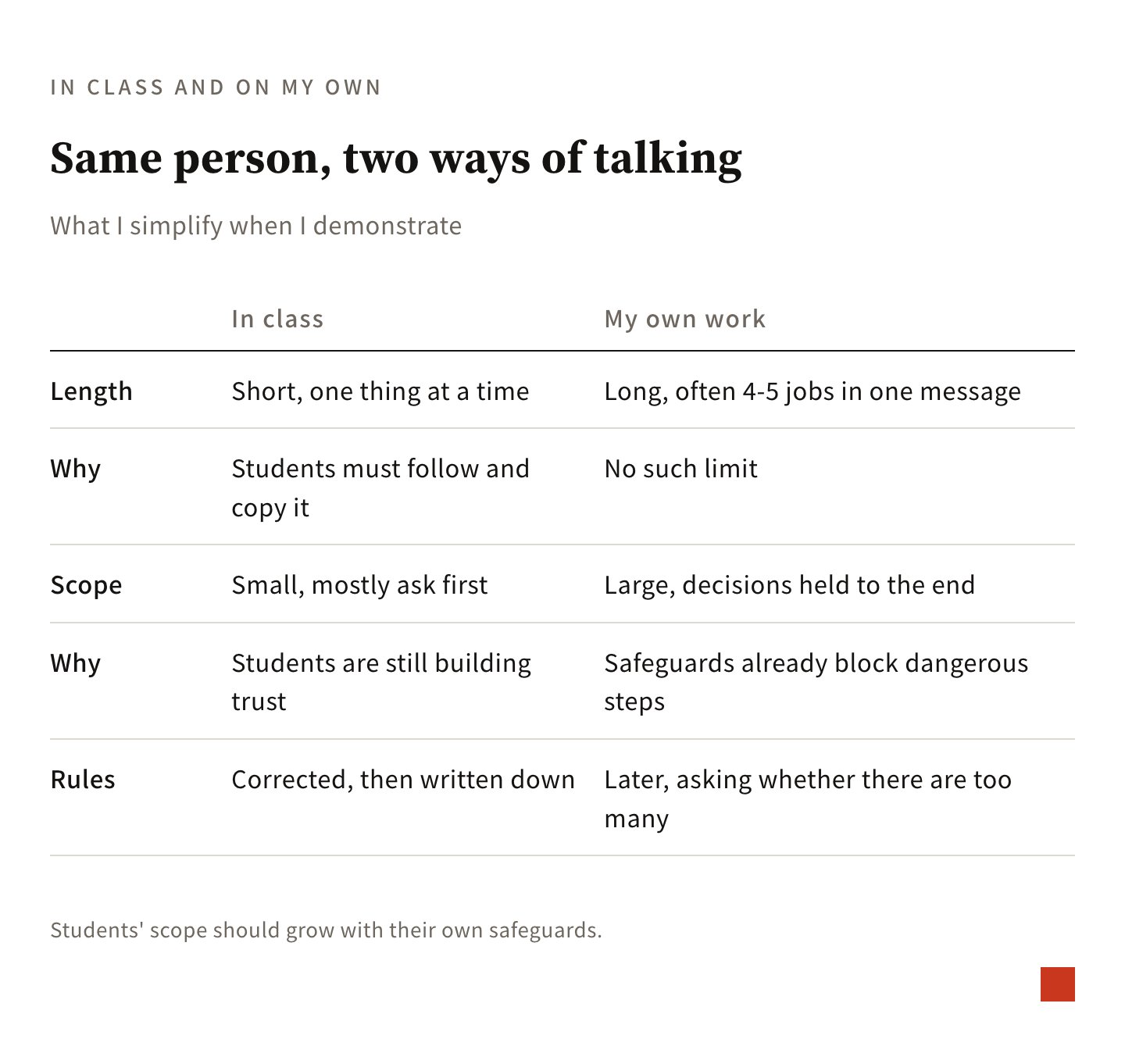
In class I mostly ask first, on my own I list decisions at the end. Students are still building trust, so in class I mostly tell the AI to ask me first. I have settings that automatically block dangerous steps, so I dare to hold decisions until the end. A student’s scope of authority should grow with their own safeguards. Don’t copy how freely I let go today.
Later, one more move appears: questioning the rules themselves. In class records, a correction usually becomes a rule. In my own commands, later on, I more often ask whether there are too many rules. That question only shows up after some time of use, so it can wait until a student is in their second or third month.
Commands I have actually used
Below are 8 exact quotes I actually used with AI. After each one, I added a sentence explaining how you can adapt it to your own situation.
1. State your concerns, goal, and context first
All right, you need to tell it what your concerns are, what your goal is, and what your context is. (translated from Chinese)
How to adapt it to your situation: Before speaking, add 3 sentences: “what I want to do,” “why I am doing it,” and “what I will use the result for.” You can leave the steps for the AI to suggest.
2. Let go, but set boundaries first
Please check my computer and see where I can safely clear 15GB. Tell me first, and do not take action yet. (translated from Chinese)
Yes, just give me the list. (translated from Chinese)
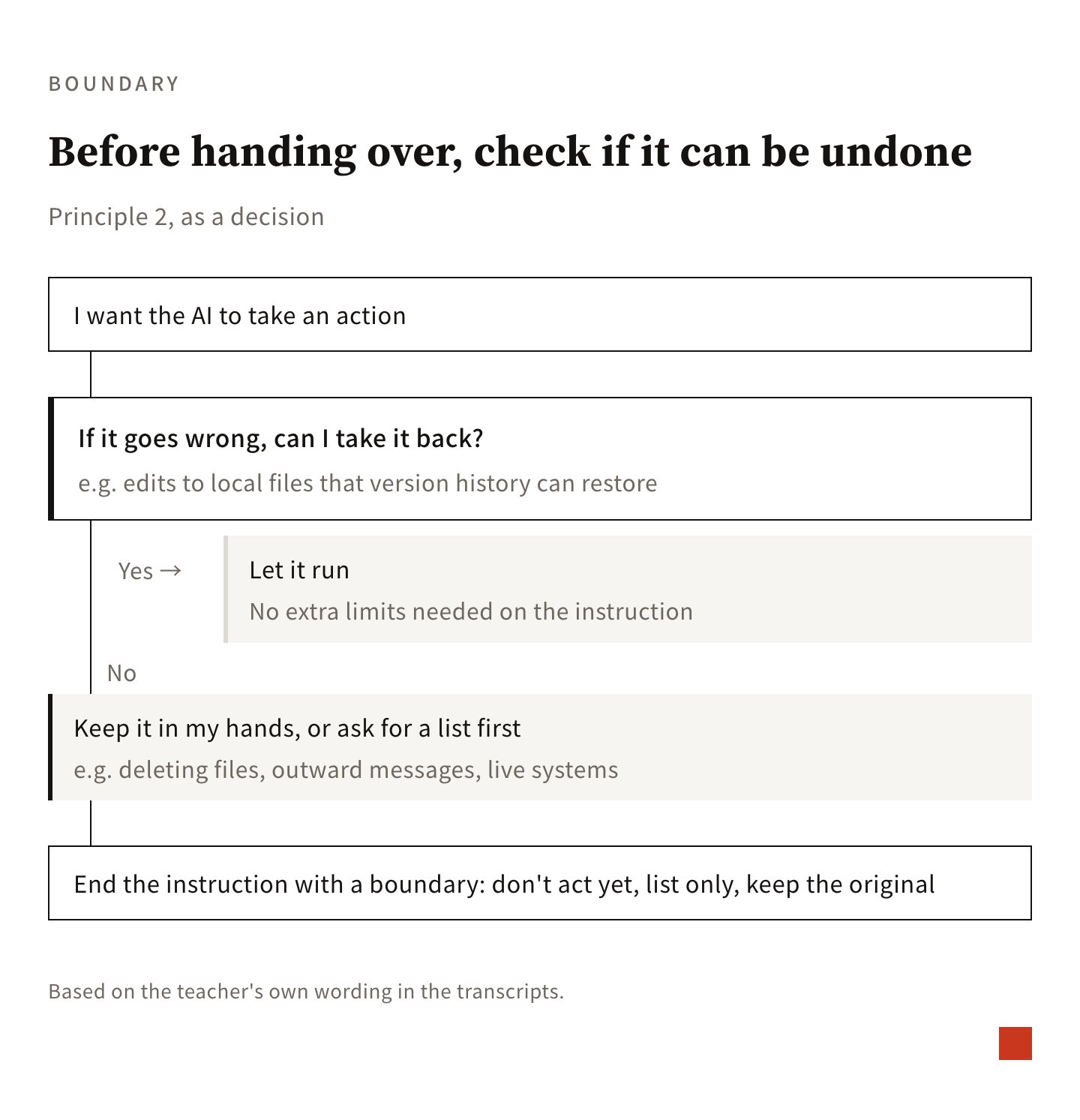
How to adapt it to your situation: When asking AI to do something, set a boundary right away, such as “show me a list first” or “keep a copy of the original file.” If a mistake can be undone, let it work freely. If a mistake cannot be undone (like deleting files or sending messages), ask for a list first and keep control yourself.
3. If you cannot explain it clearly, ask it to interview you
I have this idea, though it is hard for me to describe it to you right now. That is fine, please ask me questions. (translated from Chinese)
If you are not sure, ask me directly. Do not make decisions on your own. (translated from Chinese)
How to adapt it to your situation: When you do not know how to explain something clearly, just say, “I cannot explain it clearly yet, please interview me.” If it involves school or internal details, add, “If you are not sure, ask me directly.”
4. Once work starts, do not stop
If anything needs my decision, tell me all at once at the end. You do not need to pause along the way. (translated from Chinese)
How to adapt it to your situation: You can put this sentence at the very end of your instruction. Ask all questions at once before starting. Once work begins, have it list everything that needs your decision at the end. It does not need to keep stopping to ask along the way.
5. If you do not understand, say so directly
I do not understand this. Write it in plain language. (translated from Chinese)
How to adapt it to your situation: If you do not understand, tell it directly to rewrite in plain language, or ask it to explain with a concrete example.
6. If the result looks strange, find the cause before changing it
At the time, the AI kept making the same mistake. I suspected 2 possibilities: the conversation became too long and it forgot earlier context, or it never read the rules I gave it.
Let us not change anything yet. Let us find the cause first. Did the model forget because the context got too long and polluted? Or did it fail to read those rules? (translated from Chinese)
How to adapt it to your situation: When the AI repeatedly makes mistakes, tell it “do not change anything yet.” Have it check the original source material, explain the cause clearly, and then discuss how to fix it.
7. Separate doing from checking
The “sub agent” mentioned here is simply another AI I opened that is only responsible for checking.
I assign an independent sub agent to judge for me. Tell me what is uncertain, and I will verify it myself. (translated from Chinese)
How to adapt it to your situation: After finishing the task, open another chat and ask a different AI to review the work. Avoid telling it where you think the problems are beforehand. Have it list anything it is unsure about, and you can verify those points yourself.
8. Wrap up by having it write things down
Why did you make this mistake? Right. How do you think we can avoid this mistake in the future? And then, write that down. (translated from Chinese)
How to adapt it to your situation: Before ending the chat, always ask, “What parts did I correct you on this time?” Pick only the mistakes that might happen again. Have it record them where it reads before starting next time (such as custom instructions or rule notes). Keep each rule recorded in only 1 place.
Starter prompt
If you want to check how you usually give instructions to AI, you can start with this prompt. Replace the brackets with your details, and paste it directly to an AI that can read your chat history. It will handle the rest on its own. You only need to review the results and decide which sentences to use.
I want to check how I usually give instructions to AI. Please read my chat history from (last week / the past month) (file path: __). Look only at the instructions I typed myself, and see whether I did these 4 things: stated the goal and purpose, set boundaries when delegating, allowed you to ask first or requested an interview, and recorded corrections at wrap-up. Please put together a table showing how many times each action appeared, quote 1 exact sentence for each, and point out what is missing. Then, based on what is missing, write a draft opening instruction for my next task (__) in my usual voice. Keep it conversational. Give me a plan first, and I will review it before you begin.Appendix: how I pulled this together
This section covers how I got from two sets of records to the lines above, for anyone who wants to do the same with their own class records.
Two sets of material
The first is 30 transcripts from April to October 2026, covering one-on-one classes and company classes. The second is my own conversation records in Claude Code (an AI tool that reads and writes files directly on a computer) from June to October 2026, filtered down to 751 messages I typed myself and long enough to matter. Commands an AI sent to sub-agents and auto-suggested text were excluded.
Extraction, checking, dropping
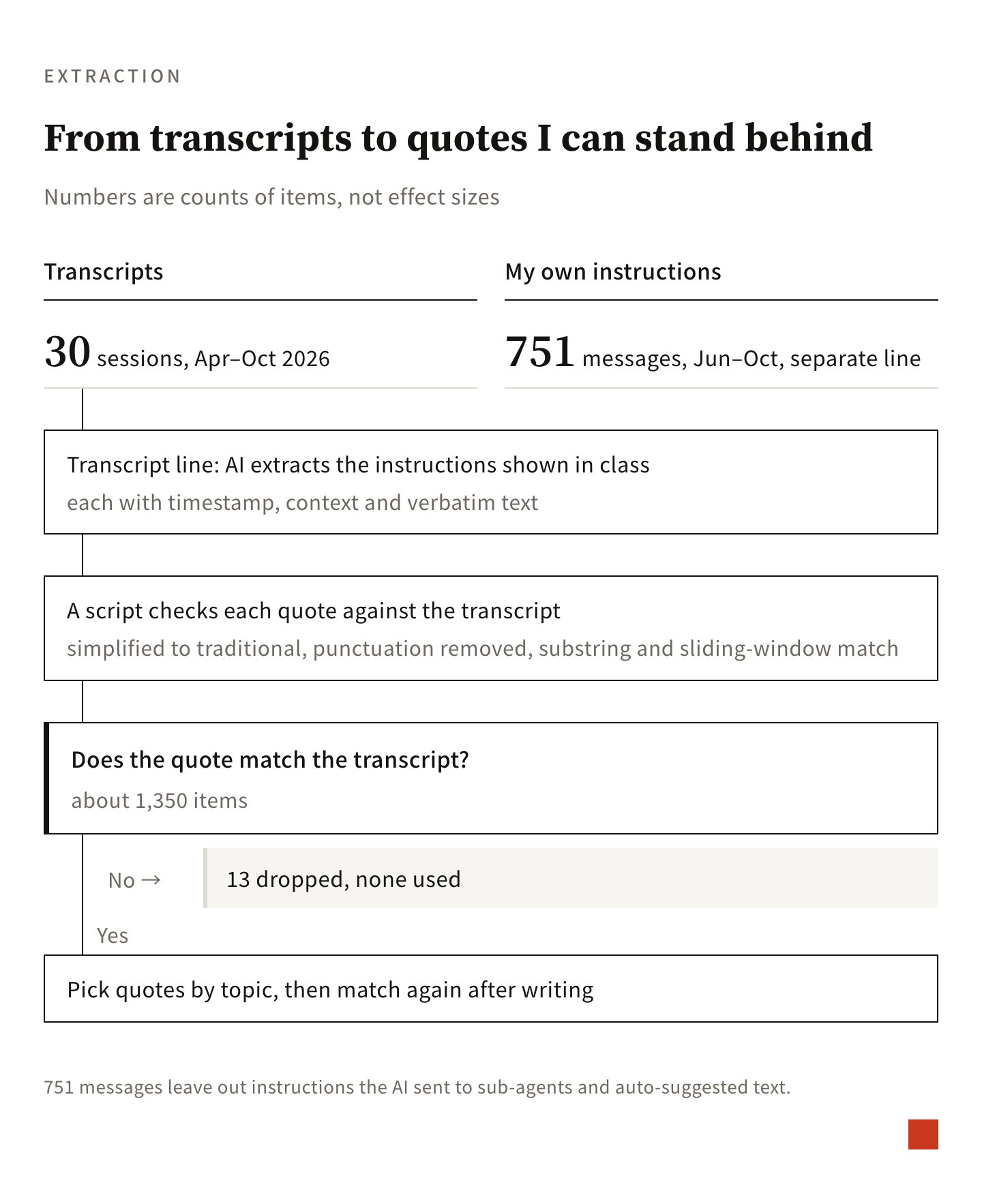
For each transcript, I had an AI pull out the commands I demonstrated in class, each with a timestamp, the situation and the verbatim text. An AI’s “verbatim” cannot be trusted as is, so I used a script to check it against the transcript: convert simplified to traditional characters, strip punctuation, then match by substring and sliding window. Of about 1,350 items, 13 did not match. All 13 were dropped.
Sorting into fixed moves
I sorted by topic myself, using a keyword index and picking quotes one topic at a time. After the quotes went into the notes, I ran the same check again. For this post, I checked each quote against the notes once more.
Transcript slips
Transcripts come from speech-to-text, so they have errors. When the notes hit an obvious one, I mark the intended meaning beside the quote.
That is all.